LLM referral traffic is therefore the measurable slice of a larger AI-influenced journey. GA4 can now classify recognized assistants, and some platforms attach explicit tracking parameters. A reliable setup preserves that raw source detail, groups it consistently, and connects the sessions to meaningful events without claiming that every AI influence is visible.
GA4 Now Includes an AI Assistant Channel
Google Analytics added an AI Assistant category to its default channel group. Google’s current channel definition says it covers traffic from sources such as ChatGPT, Gemini, DeepSeek, Copilot, and Grok. It excludes traffic from Google’s AI Overviews and AI Mode.
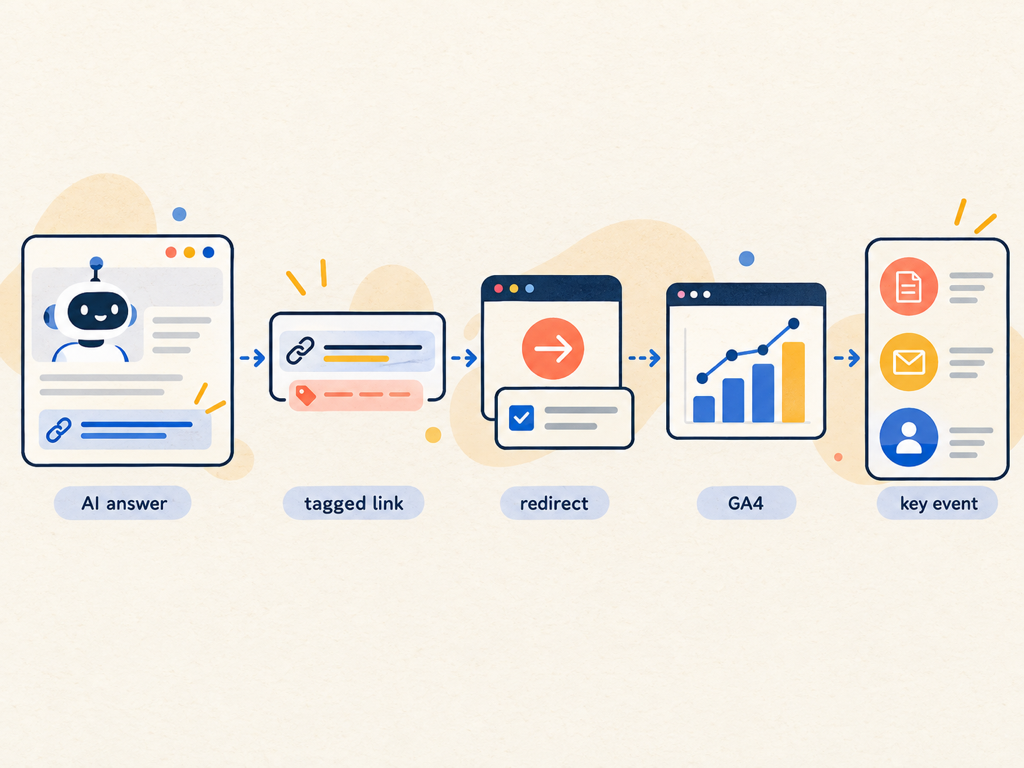
When GA4 recognizes a listed AI referrer, it sets the medium to ai-assistant and the campaign to (ai-assistant). That gives teams a standard starting point without requiring a custom regex for every known domain.
Do not stop at the channel label. Preserve and report session source, session medium, landing page, page referrer, and relevant campaign parameters. The aggregate channel answers how much recognized AI-assistant traffic arrived. The source and landing-page dimensions explain which assistant and which content produced the visit.
Historical classification can differ from the current channel definition. Note the date when you begin using the report and avoid presenting older periods as if the same source list had always applied.
ChatGPT Adds an Explicit Referral Parameter
OpenAI’s publisher FAQ says ChatGPT automatically adds utm_source=chatgpt.com to referral URLs from ChatGPT search results. Publishers that allow OAI-SearchBot can use the parameter in analytics tools to identify inbound visits.
That parameter is useful because it remains attached to the destination URL even when browser referrer handling is inconsistent. Confirm that redirects, link shorteners, consent tools, and canonicalization do not strip the query string before the analytics tag reads it.
Create a QA test using a non-production page or a safe internal campaign link. Verify the landing URL, GA4 Realtime, DebugView when appropriate, and the eventual session-source report. One visible parameter in the browser is not proof that the analytics session stored it correctly.
Avoid rewriting provider-supplied parameters into your own campaign naming unless there is a documented reason. Preserve the raw value and create a reporting layer on top. That makes future audits easier when the provider or GA4 changes its classification.
Build a Source Table Before Creating Reports
Maintain a small reference table rather than embedding provider lists in several dashboards. It should contain the observed hostname, expected source, expected medium, paid or organic status, first-seen date, last-verified date, and evidence URL.
| Field | Example purpose | Validation question |
|---|---|---|
| Observed hostname | Preserve the actual referring domain | Did the browser or analytics event record it? |
| Normalized assistant | Group several valid hostnames | Is the mapping current and documented? |
| Medium | Distinguish ai-assistant, referral, or paid | Did GA4 classify the session as expected? |
| Landing page | Identify cited or recommended content | Is the destination canonical and useful? |
| Campaign parameters | Preserve provider or paid placement tags | Did a redirect remove or overwrite them? |
| First and last verified | Track changing behavior | When was the mapping last tested? |
| Evidence status | Mark official, observed, or inferred | Can another analyst reproduce the rule? |
Review the table monthly during a new-channel rollout and quarterly once stable. Do not add a hostname because a blog post claims it belongs to an assistant. Verify it in provider documentation or your own controlled referral test.
Use Session, User, and Event Scope Deliberately
GA4 exposes acquisition dimensions at several scopes. First user dimensions describe how the person was first acquired. Session dimensions describe the source of a specific visit. Event-scoped attribution can assign credit to key events according to the property’s reporting model.
Google’s traffic-attribution documentation describes corresponding user, session, and event records in the BigQuery export. Mixing these scopes in one table can produce confusing totals.
Use session scope to answer “what did recognized AI traffic do after arriving?” Use first-user scope to ask whether AI assistants introduced new users. Use event or attribution reports to analyze credit for key events. Label the scope in every chart title.
The same visitor can first arrive through organic search, return from ChatGPT, and convert through email. First-user, session, and event reports will tell different but compatible stories.
Mark Business Outcomes as Key Events
Pageviews are not enough to evaluate LLM referral traffic. Define the action that represents value for the page and funnel stage.
For SaaS, useful events may include pricing views, demo form starts, completed demos, account creation, documentation depth, and qualified pipeline creation. For publishers, use engaged reading, article completion, newsletter signup, registration, recirculation, and return visits. For ecommerce, preserve product views, add-to-cart, checkout start, purchase, and revenue.
Google’s GA4 event guidance recommends validating events in Realtime and DebugView. Test parameters as well as event names so you can separate article, product, market, and conversion type.
Use rates and absolute counts together. A channel with 12 conversions from 80 sessions may have an impressive rate but limited business scale. A channel with 200 conversions from 20,000 sessions may contribute more value despite a lower rate.
Separate Observable Traffic From Unobservable Influence
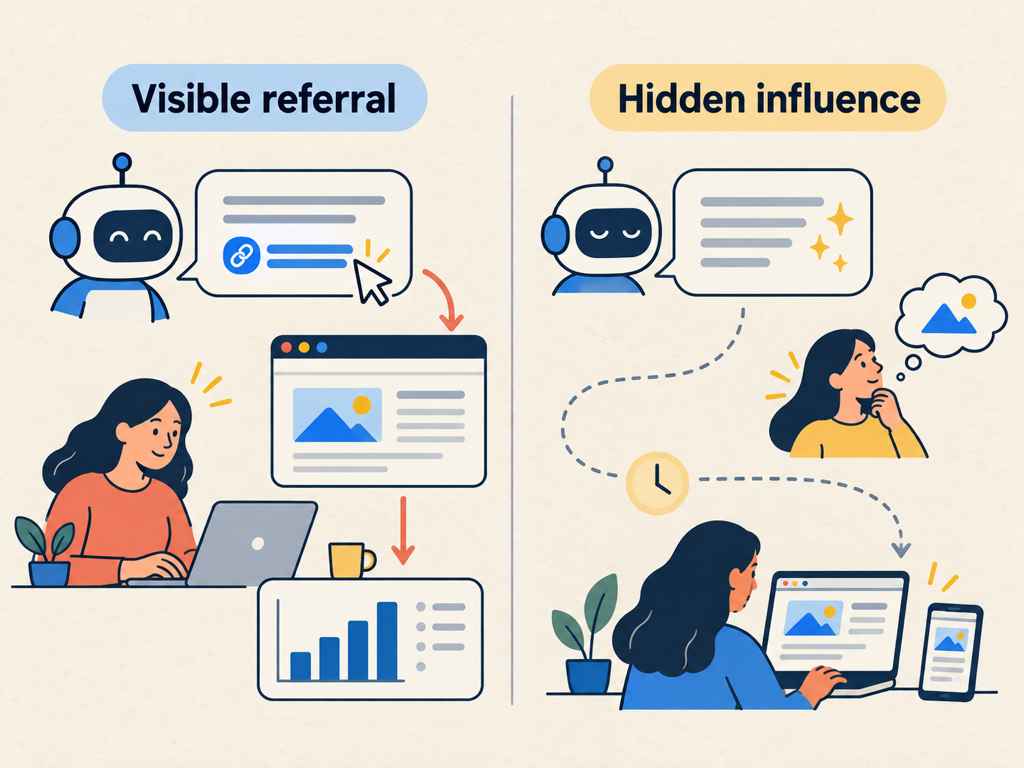
No GA4 configuration can record an impression that happened entirely inside an AI answer. It also cannot reliably identify a person who reads an answer on one device and later types the brand URL on another.
Classify evidence into three layers:
- Observed referral: a session contains a recognized AI source or campaign parameter.
- Observed on-site outcome: the session or attributed path contains defined engagement or conversion events.
- Inferred AI influence: surveys, sales notes, branded-demand changes, answer visibility, or controlled experiments suggest an effect without a traceable referral.
Keep inferred influence out of the referral count. Report it beside the count with its own methodology.
Add a “How did you hear about us?” field only when the answer is operationally useful and the added friction is acceptable. Standardize options but retain an open-text choice. Sales teams should use a controlled note field for AI-assistant mentions rather than burying them in free-form call notes.
Diagnose Landing Pages, Not Just Providers
The landing page explains why the assistant sent the visitor. Group destinations by role: original research, comparison, product, pricing, documentation, support, opinion, or tool.
Compare engagement and conversion within each role. A documentation page may attract high-intent technical visits that convert later. A comparison page may create immediate demo activity. An informational article may receive many visits but serve primarily as the first touch.
Review the exact page for current facts, a clear next step, internal links, and consistency with the likely answer context. AI-referred users may arrive after completing much of their evaluation elsewhere. Repeating introductory information without offering evidence or action can waste that qualified visit.
Connect GA4 With Answer-Level Visibility
Referral analytics starts after the click. Answer monitoring starts before it. Topify can provide a controlled prompt layer showing whether the brand is mentioned or recommended, where it appears, and which sources shape the answer.
Join the systems by time period, platform, prompt intent, cited page, and market. Do not join individual users or claim deterministic attribution when no shared identifier exists.
A practical weekly view can include prompt visibility, cited URLs, AI Assistant sessions, engaged-session rate, key events, and conversion value. A rise in answer visibility with flat traffic may indicate zero-click influence, weak link placement, or a lag. A rise in traffic without tracked prompt visibility may come from unmonitored topics or assistants.
Use the disagreement to improve the measurement universe.
Create a Repeatable QA and Reporting Routine
Run a monthly referral QA. Test known links, verify parameters survive redirects and consent flows, confirm GA4 source and medium values, check custom or default channel classification, and inspect unexplained growth in direct traffic.
Build reports at three levels:
- Channel summary: sessions, users, key events, revenue or qualified outcomes.
- Provider and landing page: source, destination, engagement, conversion, and content role.
- Influence context: answer visibility, citations, self-reported discovery, and branded demand.
Annotate changes to GA4 channel definitions, provider referral behavior, tracking consent, and site redirects. Measurement changes can look like performance changes when the chart lacks those notes.
Conclusion
LLM referral traffic is the measurable click stream from AI assistants, not the complete value of AI discovery. GA4’s AI Assistant channel and provider parameters such as utm_source=chatgpt.com make the visible portion easier to classify, but reliable reporting still requires source preservation, scope discipline, event QA, and landing-page analysis.
Start with the default AI Assistant channel, preserve raw source fields, and test one complete referral path. Then connect recognized sessions to key events and report unobservable influence separately using answer visibility, surveys, and business evidence. The result is a measurement system that respects what analytics can see without pretending the invisible part of the journey does not exist.
FAQ
What counts as LLM referral traffic in GA4?
It is a session attributed to a recognized AI assistant source or campaign parameter. GA4 now includes an AI Assistant default channel for supported sources.
Does GA4 include Google AI Overviews in the AI Assistant channel?
No. Google’s current definition explicitly excludes AI Overviews and AI Mode from the AI Assistant channel.
How does ChatGPT identify referral traffic?
OpenAI says ChatGPT search links automatically include utm_source=chatgpt.com, which publishers can read in analytics platforms.
Why is reported AI traffic lower than customer survey responses?
Many AI-influenced journeys do not create a detectable referral. They may end without a click, continue on another device, or return later through direct, search, or another channel.
Leave a Reply