Blog

  • Claude Code Won’t Replace Junior Devs. Not Yet.

    Claude Code Won’t Replace Junior Devs. Not Yet.

    We ran Claude Code through 6 real junior-level tasks. Here’s exactly where it delivered, where it broke down, and what that means for engineering teams in 2026.

    Something’s shifting inside engineering orgs right now. Hiring committees are quietly asking whether they should greenlight that junior developer requisition or just expand the AI tooling budget instead. Claude Code is sitting on the table. The conversation is uncomfortable, and most teams don’t have a framework for it yet.

    Here’s the honest answer: Claude Code is genuinely impressive, genuinely limited, and genuinely changing what junior developers are supposed to do. Not replacing them. Reshaping them.

    That distinction matters enormously if you’re making headcount decisions in 2026.

    What Junior Developers Actually Do All Day

    Before you can evaluate any AI coding tool against a junior dev, you need to stop thinking of the role as “writes code.” That’s like saying a sous-chef “chops vegetables.”

    Junior developers carry two very different kinds of work. The first kind is visible. The second kind is what keeps projects from quietly falling apart.

    The Tasks That Look Like AI Territory

    Boilerplate generation. Unit test coverage. Fixing regression bugs. Writing documentation stubs. Migrating deprecated API calls. These are the tasks that show up in sprint backlogs and get counted in velocity metrics.

    They’re also the tasks where AI is eating the most ground. Industry data from 2025 puts AI-generated code at 41% of total global output, a figure that’s still climbing. For these deterministic, well-defined tasks, Claude Code doesn’t just match junior developer output — it often exceeds it in speed and consistency.

    The Tasks That Don’t Show Up in Job Postings

    Context-gathering. Translating a product manager’s offhand Slack comment into a technically coherent spec. Sitting in a retro and absorbing institutional knowledge that’s never been documented. Building enough trust with a senior engineer to ask the “dumb questions” that surface the critical constraints nobody wrote down.
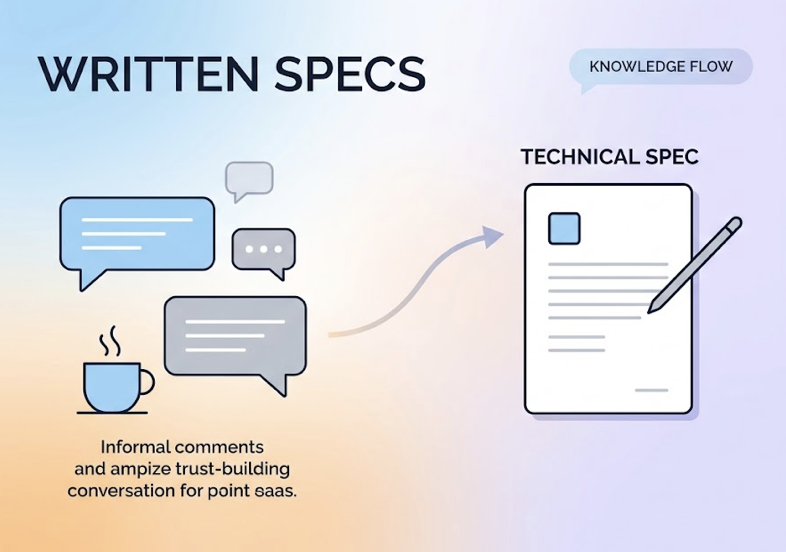
    These tasks don’t appear in job descriptions. They don’t have story points. But they’re the connective tissue that keeps software projects coherent. And in 2026, no AI agent has learned how to attend a meeting and read the room.

    6 Tasks We Tested with Claude Code

    To move past speculation, we mapped Claude Code’s performance against six real junior-level engineering scenarios. Here’s what the data shows.

    TaskClaude CodeJunior Dev Advantage
    Write unit tests for existing functionStrongMinimal — AI more thorough on edge cases
    Fix regression bug in legacy codebasePartialUnderstands implicit side-effects, tribal knowledge
    Implement feature from vague specWeakCommunication, clarification, product instinct
    Review PR and leave commentsStrongMinimal — AI coverage is broader
    Onboard into unfamiliar repoPartialBuilds social network, mental model beyond docs
    Coordinate fix across 2 servicesWeakCross-team sync, dependency negotiation

    Unit tests and PR review: Claude Code is faster, more consistent, and doesn’t experience the fatigue that makes humans skim. Its 1M-token context window lets it hold an entire microservice in working memory while identifying edge cases a junior dev would need hours to find manually.

    Legacy bug fixes and onboarding: Mixed results. Claude Code can scan 400,000 files instantly, but it can’t explain why a particular architectural decision was made three years ago under deadline pressure. It also can’t ask a colleague over lunch. Teams report that the AI produces patches that are “locally correct but globally breaking” — fixes that pass unit tests while silently introducing concurrency issues downstream.

    Vague specs and cross-service coordination: This is where Claude Code reliably struggles. Faced with an instruction like “improve the checkout experience on mobile,” it produces code. Technically valid code. Code that completely misses what the product lead actually meant. The gap isn’t technical ability — it’s the absence of any mechanism for asking a follow-up question in a human context.

    Where Claude Code Is Genuinely Faster

    Let’s give credit where it’s due, because underselling this tool doesn’t help anyone plan accurately.

    For deterministic tasks at scale, Claude Code is a different category of productive. Teams using it for framework upgrades involving 50 or more files are reporting 60 to 70% time reductions compared to manual junior dev work. That’s not marginal. That’s a structural shift in how long a certain class of work takes.

    Anthropic’s own internal teams have run five or more AI agents simultaneously, producing 300 merged pull requests in a single month. That figure would require a sizable junior engineering cohort under traditional workflows.

    For solo founders and small startups, Claude Code effectively fills the role of an entry-level engineering bench. Feed it an architecture diagram. Get back a functional backend service skeleton. Let the senior engineer focus on the decisions that actually require judgment.

    The tool also provides something human reviewers can’t: 24/7 code review with no degradation. It catches known security vulnerabilities, style violations, and architectural anti-patterns at the same quality level at 2 AM on a Sunday as it does at 10 AM on a Tuesday. For teams trying to reduce technical debt accumulation, that’s a meaningful capability.

    The Gap Nobody’s Talking About: Ambiguity

    Here’s the thing that gets lost in the “AI will take all the jobs” discourse.

    Ambiguity doesn’t live in the code. It lives in the meeting before the code.

    Real software engineering isn’t a series of well-defined tasks waiting to be executed. It’s a continuous process of converting fuzzy human intentions into precise logical instructions. A product manager says “make the onboarding feel lighter.” A stakeholder says “we need to move faster on this.” A business requirement says “optimize for retention” without specifying which cohort, over what time window, at what acceptable cost to conversion.

    Claude Code takes instructions literally. That’s not a bug — it’s an architectural constraint of how large language models work in 2026. When the input is precise, the output is excellent. When the input is ambiguous, the output is confidently wrong.

    Junior developers who understand this gap and lean into it are building the most durable career moat available right now. The skill of converting organizational ambiguity into executable specifications — through conversation, observation, and judgment — is what the research literature is starting to call “intent architecture.” It’s less about writing code and more about being fluent in two languages: human and machine.

    That skill is not going to be automated in the near term. Possibly not for a long time after that.

    What This Means for Engineering Teams in 2026

    The strategic question isn’t “should we replace junior developers with Claude Code?” The right question is “what should junior developers be doing now that Claude Code exists?”

    For engineering managers: The case for continuing to hire junior talent isn’t weakened by AI tools — it’s restructured. If you stop building entry-level pipeline today, you’ll face a senior engineer shortage in five years. There’s no accelerated path to staff-level engineering that skips the foundational learning entirely. The industry term for what happens when you stop hiring juniors is “leadership vacuum,” and it tends to arrive quietly until it’s expensive.

    What changes is the job description. Junior developers in high-performing 2026 teams are increasingly functioning as AI orchestrators and output validators. They’re writing specs that Claude Code can execute cleanly. They’re reviewing AI-generated PRs for business logic correctness, not syntax. They’re building the organizational context that no AI agent can accumulate.
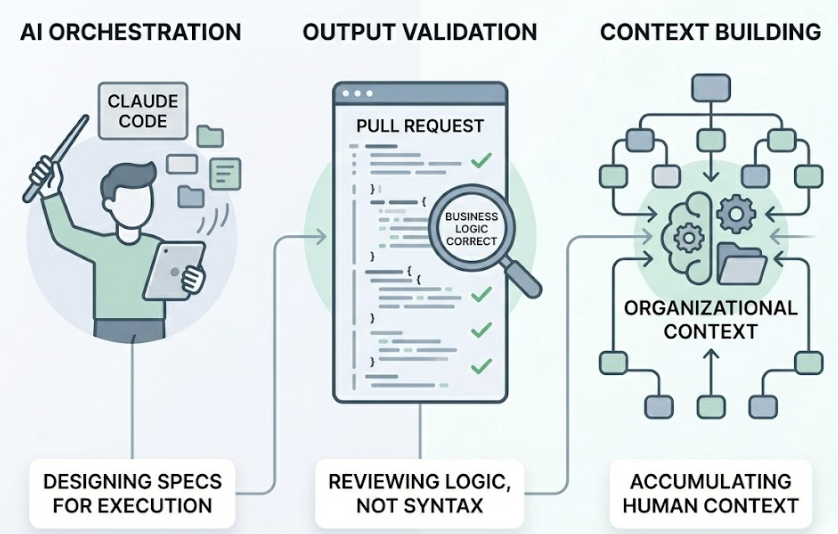
    For junior developers: The career move here is toward the parts of the job that feel most like communication and least like typing. Distributed systems architecture. Security fundamentals. The ability to walk into a room where nobody agrees on requirements and come out with a document that an AI agent can actually use. These capabilities compound over time in a way that syntax memorization never did.

    The employment data is sobering but not fatal. Employment rates for developers aged 22 to 25 are down roughly 20% from the 2022 peak. That contraction is real. But it’s also a market-correcting toward a different skill model, not toward zero. AI is projected to create approximately 2.3 million new jobs globally — significantly more than it displaces — as new industries find uses for software that previously couldn’t afford to build it.

    The developers who navigate this well are the ones treating Claude Code as a force multiplier and positioning themselves as the judgment layer it can’t replace.

    Conclusion

    Claude Code is not the end of junior developers. It’s the end of junior developers whose value is primarily measured in lines of code produced per week.

    One junior developer with Claude Code, a clear spec, and a solid understanding of the codebase they’re working in can now produce output that would have required a small team two years ago. That’s an extraordinary amount of leverage. But it requires a different kind of junior developer — one who’s fluent in ambiguity, comfortable with system-level thinking, and willing to spend time on the unglamorous work of building organizational context.

    The teams that figure this out first are going to have a meaningful structural advantage. Not because they replaced their junior developers. Because they retrained them for the work AI can’t do.

    That window won’t stay open forever. As multi-agent systems continue to mature past 2027, the coordination tasks that currently require human involvement will start to compress too. The strongest move, for both managers and early-career developers, is to stay ahead of where that line is moving.

    FAQ

    Is Claude Code reliable enough to use without a senior developer on the team?

    Not yet. Claude Code performs well on isolated, well-scoped tasks. In complex multi-service architectures, it can introduce subtle concurrency errors or make locally correct changes that break behavior elsewhere in the system. Without a senior engineer doing architectural oversight and final risk validation, AI-generated code can accumulate technical debt that’s significantly harder to unwind than the time saved upfront.

    Will AI replace software developers entirely in the next five years?

    The more useful framing is: the role is shifting from manual code production toward decision-making and specification. The entry-level “coding as typing” subskill is increasingly automated. But software engineering as a discipline — understanding systems, managing tradeoffs, communicating intent across teams — is expanding into industries that previously had no software at all. The net employment picture over five years is likely positive, but the transition is real and uneven.

    What’s the practical difference between Claude Code and GitHub Copilot for a dev team?

    Copilot operates inside the IDE, providing inline suggestions that accelerate moment-to-moment coding. It’s optimized for keeping you in flow while you work. Claude Code operates at the terminal and task level — you give it a goal, it reads the relevant code, plans a solution, and executes across multiple files. The most effective teams use both: Copilot for daily coding velocity, Claude Code for larger delegated tasks like refactors, migrations, and test generation.
    Read More

  • Claude Code: What Agentic Coding Looks Like in Practice

    Claude Code: What Agentic Coding Looks Like in Practice

    At 2:00 AM, a CI pipeline fails. No engineer opens their laptop. An AI agent reads the error logs, traces the race condition to a recent commit, implements a fix, runs the test suite, and leaves a detailed report for the morning standup.

    That’s not a demo. That’s Claude Code running a routine on Anthropic-managed infrastructure.

    If you’ve been thinking of it as a smarter autocomplete, you’ve been looking at the wrong thing entirely.

    Autocomplete Was Never the Bottleneck

    Most AI coding tools were built to solve the wrong problem.

    Typing speed was never what slowed engineers down. The real constraint is context switching: the constant toggling between the terminal, the browser, the test runner, Slack, and back again. Research tracking developer behavior found that the average knowledge worker switches applications roughly 1,200 times per day. After each switch, it takes an average of 9.5 minutes to regain productive flow. For complex coding tasks, that recovery window stretches to 23 minutes.

    That adds up to 40% of productive time lost to reorientation, not to thinking about code.

    Tools like the original GitHub Copilot made typing faster. They didn’t fix the orchestration problem.

    What Makes Claude Code Different from a Smarter Copilot

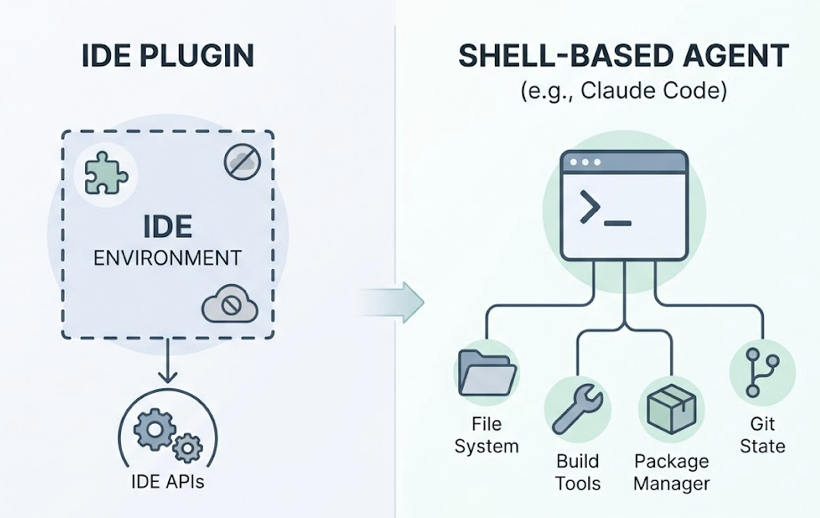
    Claude Code runs in the terminal. That’s not a UX choice; it’s an architectural one.

    By operating in the shell rather than as an IDE plugin, the agent gains unrestricted access to the full development environment: the file system, the build tools, the package manager, git state, and anything that can be piped through a command. IDE extensions are bounded by the APIs of their host environment. Claude Code isn’t.

    The context window difference matters more than most teams realize. Claude Code operates with a 1-million-token context window, meaning it can hold an entire enterprise codebase in active memory. GitHub Copilot works within roughly 8k to 32k tokens. Cursor extends that to around 200k to 400k.

    Claude CodeGitHub CopilotCursor
    InterfaceTerminal/CLIIDE ExtensionForked VS Code
    Context Window1,000,000 tokens8k–32k tokens~200k–400k tokens
    Execution AuthorityRuns terminal commandsSuggests text onlyBackground agents
    Multi-File ScopeRepository-wideLimited“Composer” multi-file
    PricingConsumption-based$10–39/mo flatSubscription/Credits

    That gap shows up concretely in complex refactoring. An assistant suggests how to update a function. Claude Code plans a 50-file refactor, executes the changes across the entire directory, and runs the test suite to verify no regressions were introduced.

    3 Workflow Shifts Claude Code Actually Creates

    These aren’t incremental. They change how engineering teams are structured.

    Shift 1: From author to orchestrator. Engineers aren’t writing every line anymore. They’re providing architectural intent and reviewing what the agent produces. Rakuten used Claude Code to implement a complex technical method across a 12.5 million-line codebase in seven hours, with 99.9% accuracy. The engineer’s value in that workflow was system design and verification, not typing.

    Shift 2: From weeks of onboarding to hours. A new developer joining a complex codebase traditionally needs weeks of documentation reading and pair programming. Claude Code can explore an unfamiliar repository, trace dependencies, and explain architectural decisions on demand. A frontend engineer can contribute to the backend layer because the agent bridges the knowledge gap in real time.

    Shift 3: From manual routines to autonomous background operations. The “Routines” feature lets teams schedule tasks to run without a human present: dependency audits, PR reviews, overnight CI analysis. The 2:00 AM scenario at the top of this article isn’t hypothetical. It’s a routine.

    That third shift is what separates Claude Code from every previous generation of dev tooling.

    Where Claude Code Still Needs a Human in the Loop

    Autonomy has limits. The current design makes this explicit.

    The first limit is business logic. An agent can find a technical fix for a bug. It may not understand why a particular “inefficient” pattern was chosen for compliance or legacy compatibility. That context lives in people’s heads, not in the codebase.

    The second limit is reliability under complexity. Research indicates that without structured human oversight, AI agents can fail multi-step tasks up to 70% of the time when encountering unforeseen edge cases. Claude Code’s Plan Mode addresses this by presenting the agent’s intended action sequence before execution, so engineers can catch misaligned decisions before they touch production systems.

    LimitationSpecific Challenge
    Regulatory sensitivityDeleting patient records requires documented human authorization
    Financial riskAI may misjudge nuance in high-stakes transactions
    Security boundariesProduction modifications demand human gates
    Subjective judgmentSatire moderation, recruiting, organizational politics

    The third limit is security. Because Claude Code can access integrated files and MCP-connected data sources during a session, the volume of sensitive information in the context window during a large repository review is substantial. Teams handling proprietary code on consumer plans should note that default data retention settings may extend up to five years without an explicit opt-out. Enterprise accounts include no-training guarantees and institution-level controls.

    The Agentic Shift Changes Who AI Recommends

    Here’s a dynamic most technical teams haven’t priced in yet.

    As AI agents like Claude Code become the primary interface through which engineers discover tools, evaluate documentation, and make technical decisions, the question of “which brand does the agent recommend” becomes a business-critical variable.

    That’s not intuitive. You’d assume that engineers do their own research. In practice, they increasingly ask Claude, Perplexity, or ChatGPT directly: “What’s the best library for X?” or “Which observability platform should we use?” The agent synthesizes an answer based on signals it’s already been trained on or retrieved from external sources.

    The data is stark. Organic traffic to websites declined by 10% to 40% in 2025, as users get direct answers from AI systems. About 60% of all queries are now “clickless searches.” And 82% to 85% of AI citations come from third-party domains, not brand websites: Reddit, forums, media coverage, community documentation.

    For technical brands, this means the usual SEO playbook is only part of the picture. The more decisive factor is how the brand appears inside AI responses across platforms.

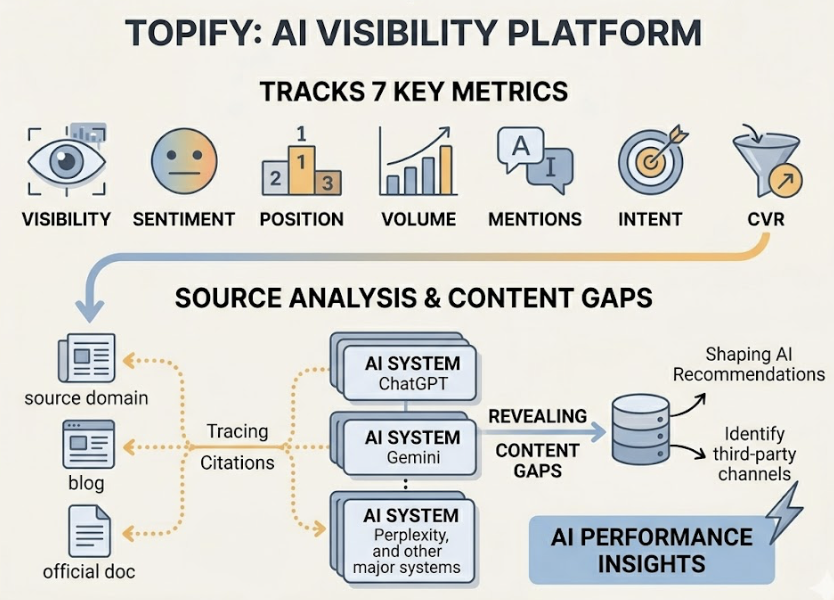
    Topify tracks exactly this. Its AI visibility platform monitors brand performance across ChatGPT, Gemini, Perplexity, and other major AI systems using seven metrics: visibility, sentiment, position, volume, mentions, intent, and CVR. Its Source Analysis feature traces which external domains AI platforms are citing, revealing where the content gaps are and which third-party channels are actually shaping the AI’s recommendations.

    Between 82% and 85% of AI citations come from third-party sources. If your documentation doesn’t show up there, your brand doesn’t show up either.

    How to Decide If Claude Code Fits Your Team Right Now

    Not every team should adopt it at the same pace.

    Solo founders and small startups see the most immediate ROI. Agentic coding effectively compresses the headcount required to ship a product. Tasks that previously required a full-time engineer’s week can be delegated to an agent session with human review at the end.

    Mid-size engineering teams benefit most in the “orchestration” model: senior engineers manage multiple agent sessions in parallel, handling technical debt or feature branches simultaneously instead of sequentially. Speed improvements on routine tasks run up to 90%.

    Large enterprises with legacy codebases (think COBOL or Fortran modernization) gain access to an agent that can navigate unfamiliar language environments and trace decades-old architectural decisions with context that a human onboarding would take months to build.

    The pricing consideration is real. Claude Code’s consumption-based model can run $100 to $200 per month for power users, compared to the flat-rate $10 to $20 of legacy assistants. The question is whether the 55% speed increase in task resolution justifies the variable spend for your team’s workload mix.

    A practical starting path:

    1. Create a CLAUDE.md in your project root capturing tech stack details, conventions, and architectural constraints.
    2. Identify two or three low-risk, repetitive tasks (linting, dependency audits) and automate them with Routines.
    3. Move senior engineers into Plan Mode for complex features, using the agent for multi-file implementation and reserving human attention for verification.

    Conclusion

    The shift Claude Code represents isn’t about writing code faster. It’s about changing what engineers spend their time doing.

    By 2028, an estimated 38% of organizations will have AI agents operating as full members of blended human-AI teams. The engineers who adapt early won’t just be faster; they’ll be working at a fundamentally different level of abstraction.

    The same dynamic applies to technical brands. In an environment where AI agents make tool recommendations, the brands with clear documentation, strong third-party presence, and measurable AI visibility will be the ones that get discovered. The brands optimizing only for Google rankings will increasingly find themselves invisible to the agents their target users are actually consulting.

    Agentic coding is live. The optimization window is now.

    FAQ

    Is Claude Code better than GitHub Copilot? 

    They serve different purposes. GitHub Copilot is an IDE extension for autocomplete and single-file assistance. Claude Code is a terminal-native agent for complex, multi-step tasks across an entire codebase, with a 1M-token context window and the ability to run shell commands and tests autonomously.

    Can Claude Code work with any codebase? 

    Yes. It operates via the terminal and can read and edit any file in your project directory regardless of language. It also supports legacy languages like COBOL and Fortran, which makes it useful for modernizing older systems.

    What’s the difference between Claude Code and Cursor? 

    Cursor is an AI-native IDE (a fork of VS Code) with a graphical interface. Claude Code is a command-line tool that follows the Unix philosophy, making it composable with other terminal tools and deployable in CI/CD pipelines.

    Does Claude Code require cloud access to run? 

    Officially, yes. It uses the Claude 3.5 Sonnet model via an Anthropic subscription and internet connection. Community-built workarounds exist to point it at local model endpoints via Ollama or LM Studio, though local models typically trail on reasoning performance.

    How does agentic coding affect security and code review? 

    It accelerates code production velocity significantly, which strains traditional review processes. Teams are increasingly adopting AI-assisted first-pass reviews while reserving human reviewers for high-level security architecture decisions. For teams handling proprietary code, enterprise-tier accounts with no-training guarantees are the safer operational choice.

    Read More

  • Claude Code MCP in Practice: GitHub, Notion & Databases

    Claude Code MCP in Practice: GitHub, Notion & Databases

    Most developers treat Claude Code like a smarter terminal autocomplete. Type a question, get an answer, copy the code, move on. That works — until you realize you’re still the one jumping between GitHub tabs, Notion docs, and your database client to gather the context Claude actually needs.

    That’s the gap MCP closes.

    Model Context Protocol (MCP) turns Claude Code from a code generator into something closer to a context-aware agent — one that can pull a PR diff, cross-reference your design spec in Notion, and check live schema before it writes a single line. This guide covers what that actually looks like in practice: the configs that work, the failure modes that don’t, and the workflows worth building.


    What MCP Actually Does in Claude Code (Not the Marketing Version)

    MCP is an open standard that defines how AI agents communicate with external tools and data sources. The short version: instead of writing API calls itself, Claude sends structured JSON-RPC messages to an MCP server, which handles the actual integration.

    Inside Claude Code, the call chain looks like this. You type “check my open PRs.” Claude identifies the relevant tool (list_pull_requests) from the loaded server description, generates a valid JSON parameter set, forwards it to the GitHub MCP server running as a local subprocess, and receives structured data back into its context window. The model then reasons over that data and responds — or kicks off the next tool call.

    That architecture solves two real problems: Claude stops being frozen in its training data, and it can access private systems it would otherwise have no visibility into.

    When does MCP actually make sense? Here’s the honest version:

    ScenarioUse MCPSkip MCP
    Frequent cross-tool data reads✓
    Complex OAuth-gated cloud services✓
    One-off simple tasks (git commit)✓
    Tools Claude handles well via Bash✓
    High-risk write operations without read-only mode✓

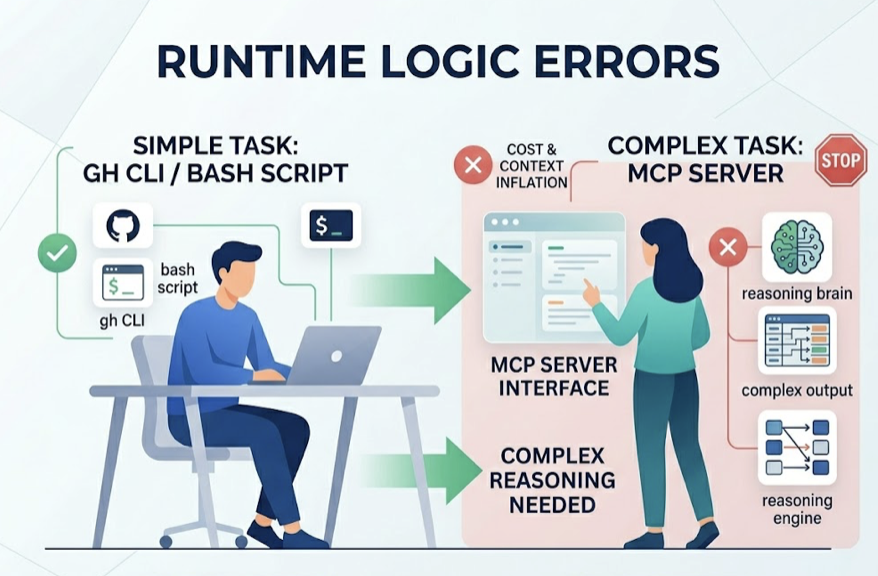
    If Claude Code can already handle a task through gh CLI or a quick Bash script, adding a full MCP server just inflates context and costs more tokens. Start with MCP where the tool’s output is complex enough that Claude needs to reason over it, not just pipe it somewhere.


    Before You Start: 3 Things Most Setups Get Wrong

    90% of MCP configuration failures trace back to the same three issues. Getting these right upfront saves hours of debugging.

    1. Version mismatches are silent killers. MCP protocol moves fast. Claude Code versions after 2.1.1 require the add-jsonformat for adding servers — the legacy command syntax fails without a clear error. Node.js versions are another common trap: most MCP servers (Notion included) require Node.js v18 or higher. If your project environment is pinned to v16, you’ll get a “Connection Closed” error that looks like a network issue but isn’t.

    Always check node --version and claude --version before touching server configs.

    2. Authentication has a strict order. For OAuth-dependent servers like Notion or hosted GitHub integrations, the sequence matters. The common mistake: launching Claude Code first, then trying to fix auth inside the session. That almost never works.

    The correct flow: run the server’s auth setup in an external terminal, confirm the access token is stored in your system keyring or config file, then start Claude Code fresh. Re-authentication mid-session typically requires a full restart anyway.

    3. Local Stdio vs. remote HTTP is a deliberate choice, not a default.

    Local StdioRemote HTTP
    PerformanceNo network latencyNetwork-dependent
    SecurityStays on your machineCloud-routed, OAuth-gated
    SetupRequires local runtime (Node/Python)URL only
    Best forDatabases, file systemsGitHub, Notion, SaaS tools

    For anything touching sensitive data — database credentials, internal files — local Stdio keeps traffic off the public internet. For cloud-native tools where you’re already authenticated via OAuth, remote HTTP is simpler to maintain.


    Integration 1: GitHub — From “Open a PR” to Actually Opening One

    The GitHub MCP server (@modelcontextprotocol/server-github) is the most mature integration available. It turns Claude Code into a teammate that can triage issues, review diffs, and surface PR context without you switching tabs.

    Which Server to Use

    Anthropic deprecated the old npm package format in April 2025. The current recommended approach uses either Docker or the streaming HTTP implementation. For most teams, the project-level .mcp.json config is the cleanest way to share setup across contributors:

    {
      "mcpServers": {
        "github": {
          "command": "npx",
          "args": ["-y", "@modelcontextprotocol/server-github"],
          "env": {
            "GITHUB_PERSONAL_ACCESS_TOKEN": "YOUR_TOKEN_HERE"
          }
        }
      }
    }
    

    Scope your PAT carefully. Read-only scopes (repo:read, pull_requests:read) are enough for most workflows. Write scopes only when you’ve validated the read-only path works end-to-end.

    Prompts That Actually Work

    Vague prompts get vague results. These patterns produce reliable output:

    PR review with context: “List all PRs merged to main in the last 24 hours that touch the auth module. Check each against the security practices defined in CLAUDE.md and flag anything that doesn’t match.”

    Issue triage with code mapping: “Find all open issues tagged bug that mention performance. Read the comments on the top 3, then locate the specific functions in the current codebase most likely responsible.”

    What Claude Code Still Can’t Do with GitHub MCP

    Image and video attachments in issues and PRs are invisible to the model. It can’t process UI screenshots or design mockups attached to tickets.

    It also can’t operate as a GitHub App or Bot identity — all actions run as the user associated with the PAT. And on large monorepos, get_repository_structure will hit context limits fast. Pair it with a purpose-built code indexing tool if you’re working in a repo with tens of thousands of files.


    Integration 2: Notion — Turning Your Docs Into a Queryable Knowledge Base

    The typical developer workflow has a painful gap: your PRD lives in Notion, your code lives in the editor, and you’re constantly translating between them. Notion MCP closes that gap by letting Claude query your docs in context.

    Setting Up the Notion MCP Server

    Notion’s official hosted server (https://mcp.notion.com/mcp) is the current recommended path. It supports standard OAuth 2.0, which means setup is a guided browser flow rather than manual token management:

    claude mcp add --transport http notion https://mcp.notion.com/mcp
    

    This triggers a web authorization prompt. One common failure: “Audience mismatch” errors. They usually mean the OAuth callback URL in your Notion developer console doesn’t match what the server expects. Fix it in the Notion developer settings before retrying.

    Internal Token vs. OAuth: Which to Use

    Internal Integration TokenHosted OAuth
    Best forSolo devs, automation scriptsTeams, enterprise
    SetupManual (add connection per page)One-time browser flow
    MaintenanceRequires page-level permission grantsAuto-scoped to workspace
    ReliabilityDepends on community server upkeepNotion-maintained

    For individuals running local automation, the internal token approach is faster to set up. For teams where multiple developers need the same Notion context, hosted OAuth is worth the extra setup time.

    Workflows That Pay Off

    Syncing action items to GitHub: “Read today’s 3pm meeting notes in Notion. Pull every action item related to database-migration and create a separate GitHub issue for each.”

    In-context doc search during refactors: Instead of opening a browser, ask Claude to search your internal Wiki for specific API authentication logic. It pulls the relevant section, reads it, and applies it directly to the code you’re working on — no copy-paste needed.

    The Latency Problem

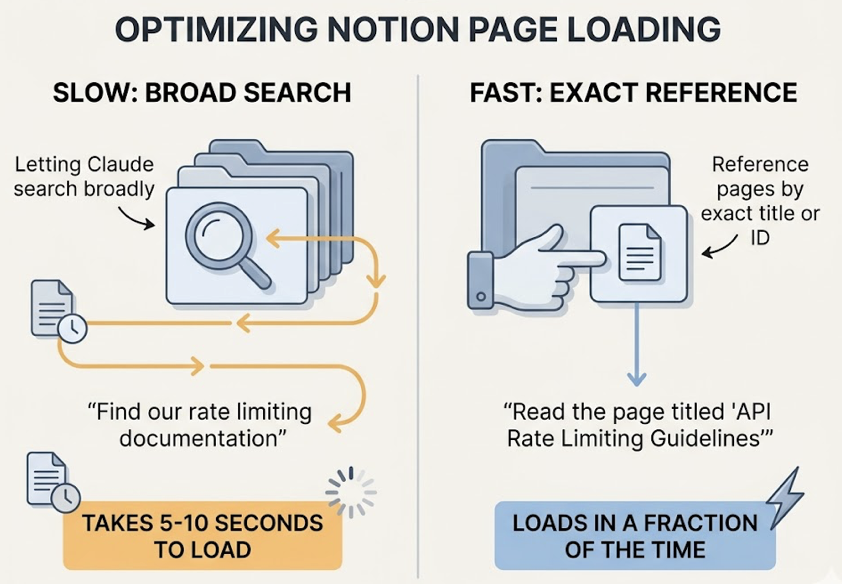
    Notion’s API rate limits and nested document structure mean large pages can take 5 to 10 seconds to load. The fix is simple: reference pages by exact title or ID rather than letting Claude search broadly. “Read the page titled ‘API Rate Limiting Guidelines’” loads in a fraction of the time “find our rate limiting documentation” takes.


    Integration 3: Databases — Reading Live Schema Without the Guesswork

    Database MCP servers give Claude a real-time view of your system state. Instead of inferring schema from context or making assumptions about table structure, it can query directly.

    Picking the Right Server

    ServerStrengthsCoverageSafety
    mcp-postgres-readonlyMaximum safety, zero write riskPostgreSQLForces READ ONLY transaction on every query
    Supabase MCPFull-stack access (Auth, Storage, Edge Functions)SupabaseConfigurable; supports OAuth
    DBeaver MCPReuses existing connection configsPostgres, SQLite, MySQL, SQL ServerCentralized, includes EXPLAIN support
    Neon MCPBranch management for testing migrationsNeon Serverless PostgresCan isolate writes to temp branches

    Default to Read-Only. Always.

    The risk isn’t theoretical. A model working with write permissions can generate and execute a DROP or TRUNCATEstatement from an ambiguous prompt — “reset the test environment” is the classic example. Even experienced developers have triggered this.

    Two-layer protection is the right approach. At the database level, create a dedicated mcp_reader role with SELECT-only grants. At the protocol level, use a server like mcp-postgres-readonly that wraps every query block in BEGIN TRANSACTION READ ONLY. Belt and suspenders.

    Schema Hallucination and How to Stop It

    Even with MCP access, the model can hallucinate column names on complex joins or nested JSONB fields. The fix is sequencing: before running any query, ask Claude to call list_tables and get_table_schema explicitly. It takes one extra round-trip, but it eliminates the guessing.

    For production databases, use a dedicated read replica rather than pointing MCP at your primary. Latency from analytical queries adds up.


    Chaining Integrations: One Prompt, Three Tools

    MCP’s real leverage shows up when you connect multiple servers in a single reasoning chain. Here’s a workflow that actually runs:

    “Read the transcript from YouTube video ID xyz. Rewrite it as a technical blog post following the style guide in our Notion workspace. Save the draft to the ‘Ready to Publish’ Notion database, then create a new Git branch and upload the image assets to /public/assets.”

    Claude Code executes this in sequence: reads the transcript (external tool), searches and retrieves the Notion style guide (Notion MCP), saves the draft (Notion MCP write), then handles the branch and file operations via local Bash.

    When Chaining Breaks

    Context window saturation. Each tool’s output eats tokens. On long chains, you’ll hit limits before the task completes. Use /compact mid-task if it’s available, or start a fresh session with only the relevant state carried forward.

    Error propagation. If the database query in step one returns bad data, every downstream action — the Notion write, the GitHub issue — runs on a flawed premise. Build checkpoint prompts into complex chains: “Before writing to Notion, confirm the data from the database query looks correct.”

    Debugging tool state. The /tools command shows every currently loaded MCP tool and its status. When a server goes silent, that’s your first check. For deeper inspection, /debug opens real-time logs that show exactly where a parameter generation went wrong.


    Conclusion

    MCP doesn’t make Claude Code magic. What it does is measurable: it eliminates the context-switching tax that slows down every cross-tool workflow.

    The practical path forward is incremental. Start with read-only GitHub queries — it’s low-risk and high-payoff. Add Notion search for document-heavy workflows. Connect your database in read-only mode once you’ve seen how the model reasons over live schema. Document the tool preferences and constraints in your CLAUDE.md file so Claude knows which servers to reach for and which parameters you care about.

    Write permissions come last, after you trust the model’s behavior in your specific stack.

    That’s the real upgrade: not a smarter chatbot, but an agent that knows your codebase, your docs, and your data well enough to act on them.


    FAQ

    Does Claude Code MCP work with the Claude.ai web interface? 

    No. Claude.ai has its own “Connectors” feature, but it’s separate from Claude Code’s MCP. Claude Code’s MCP is designed for CLI environments and supports deeper integrations — direct file system access, local database connections — that the web interface doesn’t expose.

    Can I build a custom MCP server for internal tools? 

    Yes. Anthropic provides TypeScript and Python SDKs for building MCP servers. If your internal tool exposes an API, wrapping it as an MCP server is typically a few hundred lines of code. Make sure your server handles either stdio or HTTP transport depending on how Claude Code will connect.

    Is MCP integration available on all Claude Code plans? 

    The MCP protocol itself is open. But heavy tool usage — frequent multi-step chains with large context outputs — consumes tokens faster than standard coding sessions. Pro or Max plans are typically needed for production-scale integration workflows.

    How do I debug a broken MCP connection? 

    Run claude mcp list to check server status. Check logs at ~/Library/Logs/Claude/on macOS or %APPDATA%\Claude\logs\ on Windows. Use /tools inside a session to confirm the server’s tools are visible to the model. If the server shows as connected but tools aren’t appearing, a full Claude Code restart usually resolves it.


    Read More

  • Your Code Reviews Are Slow. Claude Code Isn’t.

    Your Code Reviews Are Slow. Claude Code Isn’t.

    The average pull request waits more than four days before a single human looks at it. That’s not a people problem. It’s a systems problem, and it’s quietly draining millions of dollars from engineering teams that think they’re moving fast.

    The good news: agentic tools like Claude Code are changing the math on review automation. Here’s exactly how to set it up.


    The Real Cost of Manual Code Review

    Four days of PR idle time sounds frustrating. The actual cost is worse than it sounds.

    When a pull request stagnates, the author doesn’t just wait. They context-switch to other tasks to stay productive. By the time feedback arrives, re-acquiring the original mental model takes about 30 minutes of re-orientation per developer. That tax is paid twice: once to switch away, once to switch back.

    Scale that across a team. For an 80-person engineering organization, a suboptimal review process costs roughly $3.6 million annually, based on a fully-loaded engineering rate of $172/hour. In teams where PRs sit idle more than half their total lifespan, wasted time averages 5.8 hours per developer per week.

    The gap between elite teams and the rest is stark. Google maintains a median review turnaround under four hours. The broader industry average sits near 4.4 days. That delta represents competitive advantage, not just comfort.

    Team TierPR Pickup TimePR Cycle Time
    Elite (e.g., Google)< 7 hours< 26 hours
    Mid-tier6–50 hours2–5 days
    Lagging50–137+ hours> 7 days
    Industry Average4+ days~5 days

    Closing that gap from 48-hour pickup to 8-hour pickup saves an estimated $15,580 per developer annually. For a ten-person team, that’s over $150,000 in reclaimed productivity.

    What Senior Engineers Are Actually Doing All Day

    Here’s the uncomfortable data point: only 15% of code review comments address actual logic defects or architectural flaws. The remaining 85% are nitpicks about naming conventions, spacing, and stylistic preferences.

    Microsoft research found that up to 75% of human review comments relate to “maintainability” rather than technical correctness. That’s three-quarters of a senior engineer’s review time spent on tasks that automation handles better, faster, and without the interpersonal friction.

    The rise of AI-generated code hasn’t helped. AI-authored pull requests contain roughly 1.7x more issues than human-authored ones, with a 3x increase in readability issues and a 2.74x increase in security vulnerabilities. Without a corresponding agentic review layer, the speed gains from AI coding tools just relocate the bottleneck downstream.


    What Claude Code Actually Does in a Code Review

    Claude Code isn’t a linter with a chat interface. It’s a reasoning agent.

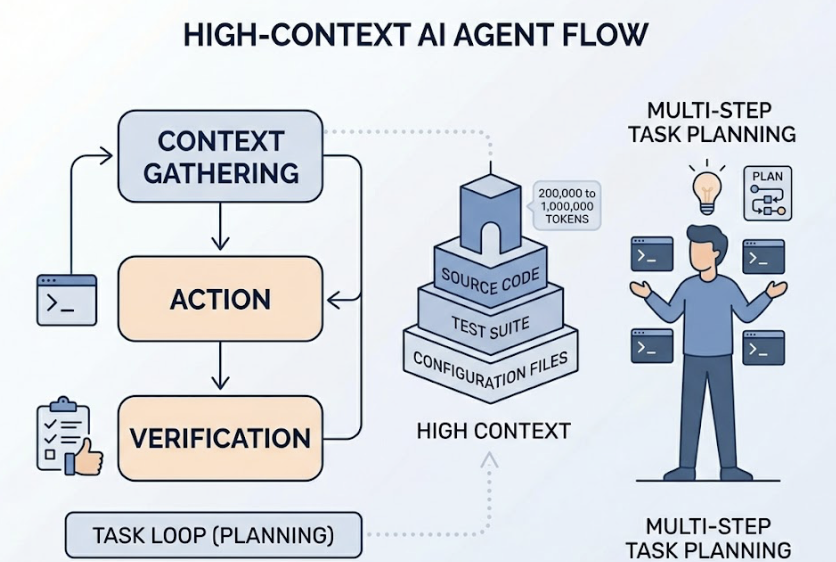
    Unlike IDE autocomplete tools, Claude Code navigates entire codebases, plans multi-step tasks, and verifies results through actual terminal interaction. It follows a task loop: gather context, take action, verify outcome. The agent uses models like Claude Sonnet 4.6 with a context window ranging from 200,000 to 1,000,000 tokens, meaning it can hold your source code, test suite, and configuration files in memory at the same time.

    CapabilityTraditional AI AssistantsClaude Code
    Operating ModeUser-drivenAgent-driven
    File ScopeSingle file or limited contextRepository-wide
    Tool IntegrationIDE onlyTerminal, Git, MCP, CI/CD
    VerificationManual (developer runs tests)Automated (AI runs and fixes tests)
    MemoryStatelessCross-session via CLAUDE.md

    What It Catches That Human Reviewers Miss

    Human reviewers suffer from attention thinning. Defect detection peaks at pull requests of 200 to 400 lines of code, requiring roughly 60 minutes of focused attention. Beyond 500 lines per hour, the ability to spot critical defects collapses. PRs under 100 lines enjoy an 87% defect detection rate. PRs over 1,000 lines drop to 28%.

    Claude Code maintains consistent analytical depth regardless of change set size. Specifically, it reliably catches:

    • Branch and multi-step logic errors in conditional routing and complex coordination flows
    • Concurrency and race conditions in asynchronous code, across languages
    • Cross-file dependency breaks where a utility change causes a silent failure in an unrelated service
    • Security vulnerabilities from the OWASP Top 10, including SQL injection in interpolated strings and broken JWT verification
    • Incomplete patches that fix a bug but leave similar vulnerabilities in adjacent code paths

    That last category is where human review most commonly fails. Fixing a bug is easy. Verifying that the same bug doesn’t exist in five similar patterns elsewhere in the codebase requires the kind of whole-repo traversal that’s trivially easy for an agent and genuinely tedious for a person.


    Setting Up Claude Code for Code Review

    Claude Code is terminal-first. The setup is straightforward, but getting the configuration right determines whether it works like a sharp tool or an expensive toy.

    Prerequisites and Installation

    System requirements:

    • macOS 10.15+, Ubuntu 20.04+, or Windows 10+ (via WSL 2)
    • Node.js 18+ and Git 2.23+
    • Minimum 4GB RAM (8GB recommended for larger repos)
    Installation MethodCommandBest For
    Native installercurl -fsSL https://claude.ai/install.sh | bashmacOS/Linux
    NPM globalnpm install -g @anthropic-ai/claude-codeNode-centric teams
    Pinned versioncurl... | bash -s 1.0.58Production consistency

    Authenticate via the Claude Console or set an ANTHROPIC_API_KEY environment variable. Enterprise teams can route through Amazon Bedrock or Google Vertex AI for data residency and zero-data retention modes.

    Connecting Claude Code to Your Repo with CLAUDE.md

    The single most important configuration step is the CLAUDE.md file. Place it at the project root. It’s Claude Code’s persistent memory: the document that tells the agent what your team values, what commands to run, and what patterns to avoid.

    Keep it under 200 lines. The “Golden Rule” here is signal density. A bloated CLAUDE.md loses its effectiveness fast.

    A well-structured CLAUDE.md follows this hierarchy:

    SectionExample ContentWhy It Matters
    Tech StackReact, Go, PostgresEliminates 90% of framework errors
    Commandsmake test, pnpm buildAgent can verify its own work
    Style Rules“Use interfaces over types”Improves consistency by 70%
    Anti-Patterns“NEVER use any“Hard constraints stick better than preferences

    Use the @ syntax to link to external documentation files rather than inlining everything. This keeps CLAUDE.md lean while giving the agent access to deep context on demand. For monorepos, add directory-level CLAUDE.md files in subdirectories to scope rules by module.

    Run /init to let Claude Code analyze your repository automatically. It’ll detect build systems and frameworks, giving you a working baseline.


    3 Claude Code Automation Patterns That Actually Work

    Pattern 1: Automated PR Summaries on Every Push

    Most PR descriptions are useless. “Fix bug.” “Update auth.” These tell reviewers nothing and slow down triage.

    Pipe a git diff into the Claude Code CLI and get a PR summary that includes which modules are affected, what tests were run, and what edge cases the reviewer should watch. At Rakuten, this level of automation contributed to reducing average feature delivery time from 24 working days to 5 days.

    You can generate these summaries pre-push as a git hook or as a CI step immediately after a PR opens. Either way, the reviewer arrives with context instead of having to build it from scratch.

    Pattern 2: Style Enforcement Without the Arguments

    Nitpick comments create friction, damage morale, and consume senior engineer time on tasks a machine can handle better. Claude Code addresses this through custom Skills, stored in .claude/skills/, that act as automated style guardians.

    A code-review skill can enforce your TypeScript conventions before any human sees the PR: prohibiting the any type, requiring props interfaces to follow component name prefixes, enforcing arrow functions for React components. The “bikeshedding” comments get resolved silently.

    In practice, this reduces a senior engineer’s initial review pass from 30–60 minutes to under 5 minutes. That’s not a small number when multiplied across 20 PRs a week.

    Pattern 3: Logic and Edge Case Flagging Before Human Review

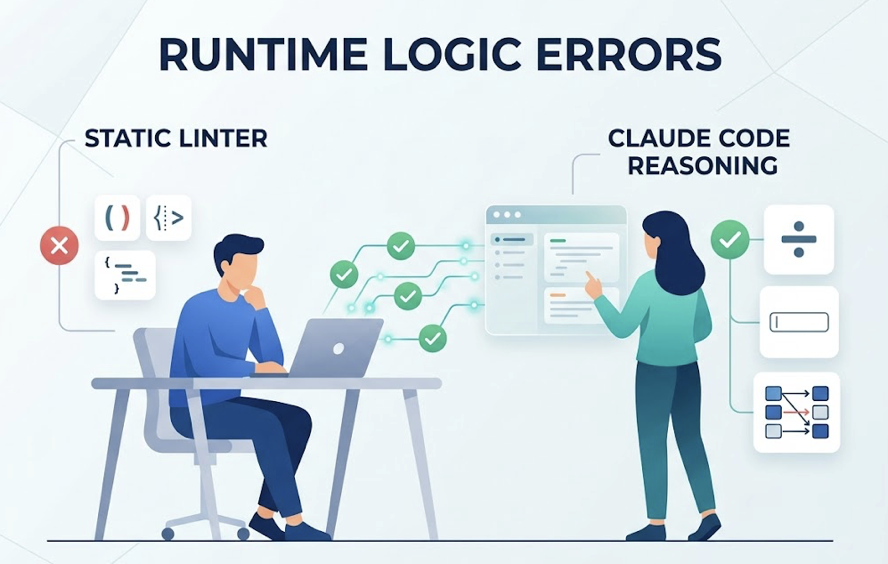
    This is where Claude Code earns its keep over any linter. Its reasoning capability lets it catch runtime issues that static analysis misses entirely: division by zero in numeric flows, unhandled empty strings in form processing, field mapping errors between serializers and DTOs, race conditions in async event handlers.

    The pattern is simple: Claude Code runs a logic pass before the PR enters the human review queue. By the time a senior engineer looks at the code, the question isn’t “Does this work?” It’s “Is this the right architecture for what we’re building?” That shift in question is the entire point.


    Plugging Claude Code Into Your CI/CD Pipeline

    The full automation payoff comes when Claude Code runs on every push without manual invocation. The primary mechanism is the Claude Code GitHub Action (anthropics/claude-code-action@v1).

    GitHub Actions Integration

    name: Claude AI Review
    on:
      pull_request:
        types: [opened, synchronize]
    jobs:
      claude-review:
        runs-on: ubuntu-latest
        permissions:
          contents: write
          pull-requests: write
          issues: read
        steps:
          - uses: actions/checkout@v4
            with:
              fetch-depth: 0
          - uses: anthropics/claude-code-action@v1
            with:
              anthropic_api_key: ${{ secrets.ANTHROPIC_API_KEY }}
              prompt: "Review the git diff for this PR. Focus on logic errors and security. Use project guidelines in CLAUDE.md."
              claude_args: "--model claude-sonnet-4-6 --max-turns 20"
    

    For AWS Bedrock or Google Vertex AI deployments, use OpenID Connect (OIDC) instead of static secret keys. This lets the agent operate in regulated environments without credential exposure.

    When to Trigger Automated Review vs. Human Escalation

    The most effective teams use a tiered approach:

    TriggerWho RunsFocus
    Every pushClaude CodeStyle, logic, edge cases, security
    @claude mentionClaude CodeFeature implementation, targeted refactors
    Post-AI-passSenior EngineerArchitecture, intent, product context

    Use --max-turns to cap token consumption and prevent runaway jobs. Trigger the full review only on opened and synchronizeevents, not on label changes or comment edits. For cost optimization, lightweight models like Haiku handle extraction and summarization while Sonnet or Opus handles final architectural critique.


    What You Still Need a Human For

    Claude Code is not a replacement for engineering judgment.

    The agent executes within constraints humans define. Someone has to write the CLAUDE.md. Someone has to design the Skills. Someone has to decide what “good architecture” means for this product in this market at this stage.

    Humans remain responsible for:

    • Defining the constitution: CLAUDE.md and Skills encode team culture and risk tolerance. That’s not something an agent can invent on its own.
    • High-level planning: Claude can execute multi-file refactors, but the architectural vision behind them requires human reasoning about product direction.
    • Final merge approval: Every automated change should flow through a PR where a human provides the final merge. The agent is a verifier, not a decision-maker.
    • Handling ambiguity: When requirements are unclear, a human must define success before the agentic loop begins.

    Stripe deployed Claude Code to 1,370 engineers, freeing them from manual 10,000-line migrations. The engineers didn’t disappear. They moved upstream.

    That’s the actual value proposition: shifting senior engineering time from “human linter” to “human architect.”


    Conclusion

    Manual code review isn’t slow because engineers are slow. It’s slow because the process isn’t designed for the volume of code modern teams ship. PR queues, context loss, nitpick cycles, and rubber-stamping large changes are structural problems that structural tools can fix.

    Claude Code handles the mechanical 85% of review work: style, logic, edge cases, security, dependency tracing. What’s left for humans is the 15% that actually requires judgment. That’s a better use of everyone’s time, and the numbers, $150K+ in reclaimed productivity per 10-person team, make the ROI clear.

    Start with a CLAUDE.md, one automation pattern, and a GitHub Action. You’ll see the return before the end of the sprint.


    FAQ

    Q: How does Claude Code affect CI/CD costs?

    A: Claude Code runs on GitHub-hosted runners using standard Actions minutes. AI costs are token-based. Use --max-turnsto prevent runaway jobs, and trigger reviews only on opened and synchronize events. For larger teams, hybrid model strategies (Haiku for extraction, Sonnet for orchestration) keep costs manageable.

    Q: Can Claude Code access sensitive internal libraries?

    A: Yes. Through the Model Context Protocol (MCP), Claude Code connects to internal documentation and proprietary libraries while keeping execution local. For environments with strict data residency requirements, AWS Bedrock and Google Vertex AI integrations support zero-data retention mode.

    Q: How do we prevent Claude from making too many autonomous changes?

    A: Claude Code uses a permission-based architecture. By default, it’s read-only and requires explicit approval for every write or bash command. In CI/CD, all changes flow through pull requests requiring human merge approval. The agent is structurally prevented from merging its own changes.

    Q: What’s the difference between Claude Code and Cursor?

    A: Cursor is an AI-enhanced IDE built for interactive coding: you drive, the AI assists. Claude Code is a terminal-first agent built for autonomous multi-file orchestration: the AI drives, you supervise. They’re not direct competitors. Many teams use both, Cursor for active development, Claude Code for verification and CI automation.


    Read More

  • Advanced Claude Code Prompting: What Most Devs Miss

    Advanced Claude Code Prompting: What Most Devs Miss

    You ask Claude Code to fix a bug. It gives you a clean, logical solution. You paste it in. The build breaks.

    The code wasn’t wrong. The problem is that Claude had no idea it was stepping into a codebase where that pattern was explicitly banned three quarters ago after a production incident.

    That’s the gap most developers never close. And it’s not a model problem. It’s a prompting infrastructure problem.

    The Context Gap Claude Code Can’t Close on Its Own

    Claude Code doesn’t start a session with a mental map of your project. It can’t. It doesn’t know your dependency preferences, your naming conventions, or the architectural decisions your team made six months ago. It knows what you tell it.

    Researchers who’ve studied agentic coding workflows call this “architectural blindness.” The agent builds a localized picture of your codebase through file reads and grep searches, but unless it’s given explicit context about the project’s “unwritten rules,” it defaults to generic industry patterns. Those generic patterns often clash with your specific setup.

    The result isn’t a hallucination. It’s a reasonable answer to the wrong question.

    The fix isn’t prompting harder. It’s prompting smarter, starting before you write your first query.

    CLAUDE.md Is the File Your Project Has Been Missing

    Every Claude Code session loads one file automatically: CLAUDE.md, stored at your project root. It’s the only document that’s injected into context every single time. Most developers either skip it entirely or fill it with so much information that Claude stops paying attention.

    The research is clear on what actually works: a three-tier structure.

    Project Identity (WHY): A short description of what the project does and its tech stack. This helps Claude prioritize decisions. A high-frequency trading module has different constraints than a marketing dashboard.

    Codebase Mapping (WHAT): Where things live. Especially critical in monorepos. Don’t assume Claude can navigate your directory structure intuitively.

    Operational Protocols (HOW): The non-obvious stuff. Custom build commands, naming conventions, and explicitly forbidden practices. This is where you document the decisions that would take a new engineer two weeks of pain to discover.

    Include ThisWhy It Matters
    Custom build/test commandsPrevents Claude from guessing npm test when you use make test-suite
    Non-standard naming conventionsPascalCase filenames, custom suffixes, module identifiers
    Architectural invariants“Never expose DB types in the service layer”
    Dependency preferencesUse the internal Result type, not a new library

    One critical constraint: keep it under 200 lines. Every line in CLAUDE.md consumes tokens. Past 300 lines, the signal-to-noise ratio drops and Claude starts deprioritizing specific instructions in favor of more recent session context.

    For complex projects, use the @imports syntax. Your root CLAUDE.md can reference @docs/api-conventions.md only when Claude is working on the API layer. That modularity keeps the agent focused instead of overwhelmed.

    Stop Prompting Functions, Start Prompting Architecture

    The most common mistake isn’t the CLAUDE.md. It’s how developers frame individual prompts.

    “Fix the bug in auth.ts” is a function-level prompt. Claude will fix the bug. It may also introduce a pattern that violates your error-handling conventions, or add a dependency you already have an internal replacement for.

    The better version: “This function is part of the OAuth2 provider. It handles token expiration. It must use the existing Result type for error handling. Don’t introduce new dependencies. Run the integration tests in tests/auth/ after your changes.”

    That’s architectural prompting. You’re giving Claude the constraints it needs to make decisions that fit your system, not just the problem.

    Fragmented PromptingArchitectural Prompting
    “Fix the bug in auth.ts”“This function is part of the OAuth2 provider, handling token expiration per docs/auth-flow.md“
    No constraints stated“Use the existing Result type, no new dependencies”
    “Does it work?”“Run tests/auth/ and verify log output matches our structured format”

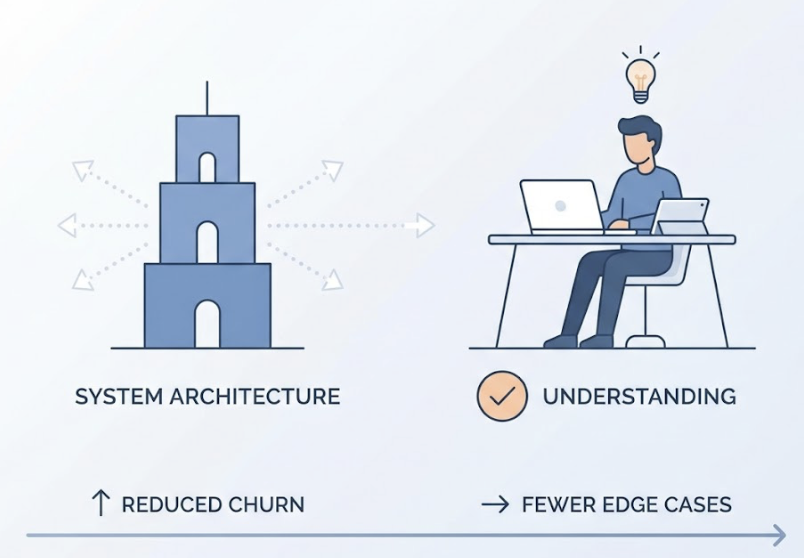
    The practical benefit here is less churn. When Claude understands architectural boundaries, it stops proposing changes that violate systemic invariants. It also catches more edge cases on the first pass because it knows what “correct” means in your context, not just in the abstract.

    For long-term consistency, some teams use a “Business Brain Pattern”: a /brain/ directory that centralizes shared business logic, technical standards, and architectural decisions. Individual tasks reference these files. When a standard changes, you update one file and every future Claude session automatically inherits it.

    Role Prompting That Survives a Long Session

    In extended sessions, Claude gradually drifts. As the context window fills with code diffs and error logs, the persona you set at the start gets diluted. A session that began with “strict security reviewer” mode often ends up in “helpful assistant that prioritizes shipping.”

    That’s “identity drift,” and it’s fixable.

    Set the identity anchor explicitly at the start of each session:

    • Persona definition: “You are a senior systems architect focused on high-performance backend systems.”
    • Valuation model: “You prioritize correctness and memory safety over syntactic shortcuts.”
    • Actionable mandate: “Every code change must include a complexity note and a verification step.”

    This isn’t just about tone. When you codify the valuation model, you give Claude a decision-making framework it can apply consistently, even 40 messages into a session.

    For teams running multiple Claude Code sessions in parallel, role prompting becomes a scoping mechanism. One agent handles security audits. Another handles performance optimization. You prevent “context pollution” where an agent over-engineers a solution because it knows too much about adjacent concerns.

    This scales even further with specialized SKILL.md files. Package a role definition, a set of allowed tools, and a verification checklist into a single slash command. /audit becomes a repeatable, consistent behavior instead of a prompt you rewrite every time.

    Prompt Chaining: Don’t Ask Claude to Do Everything at Once

    “Build a complete authentication system” is what researchers call a “mega-prompt.” It sounds efficient. In practice, it leads to instruction fatigue: Claude misses subtle constraints, skips edge cases, and occasionally produces a build that technically compiles but violates three project conventions.

    The four-phase orchestration model fixes this:

    Phase 1: Explore. “Search the codebase and identify all files related to the auth feature. Report what you find. Don’t make any changes.” Claude maps the territory without touching it.

    Phase 2: Plan. “Based on what you found, propose a step-by-step implementation plan. Do not write code yet.” Review the plan. Catch architectural misalignments before they’re baked into files.

    Phase 3: Implement. Break the plan into atomic sub-tasks. “Implement the data model” is one prompt. “Implement the API endpoint” is the next. Each has its own verification step.

    Phase 4: Verify. “Run the full test suite and audit the changes for security issues.” A dedicated review prompt, not an afterthought.

    PhaseDeveloper GoalAgent Output
    ExploreMinimize search spaceRelevant files and modules
    PlanPrevent architectural driftStep-by-step markdown plan
    ImplementHigh-quality code outputFile edits (diffs)
    VerifyZero regressionsTest reports, lint results

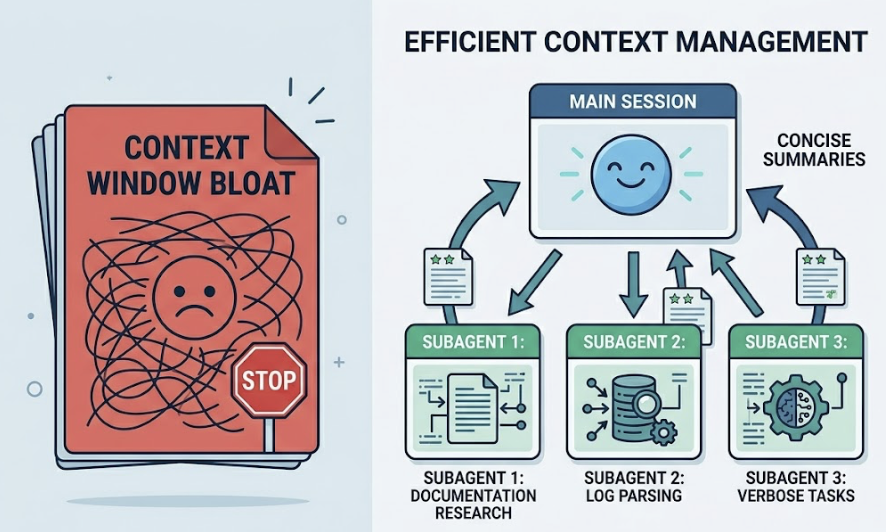
    For verbose sub-tasks, like researching documentation or parsing large log files, delegate to subagents. They run in separate context windows, process thousands of tokens, and return only a concise summary to your main session. That prevents the context bloat that kills long sessions.

    When Claude Gets It Wrong: The Recovery Prompt Stack

    Agentic “doom loops” are real. Claude fixes a bug, creates a new one, then tries to fix that with increasingly erratic changes. The instinct is to re-ask the same question more firmly. That rarely works.

    There are three structured recovery templates that do.

    Template 1: The Rationale Reset (for logical errors)

    “You attempted to fix [X] but introduced [Y]. Stop. Explain: 1) What was the root cause of X? 2) Why did your fix fail? 3) Propose a new approach that specifically avoids Y.”

    This forces chain-of-thought reasoning before any more files get touched. It consistently outperforms direct re-prompting on complex debugging tasks.

    Template 2: The Constraint Anchor (for convention violations)

    “Your solution violates the naming conventions in CLAUDE.md. Re-read the Naming section and refactor your changes to comply. Do not change the logic.”

    You’re using the persistent context file as a source of truth to override session drift.

    Template 3: The Evidence-First Protocol (for build failures)

    “The build is failing with: [paste log]. Do not guess the fix. First, read [config file path]. Second, tell me your interpretation of the error. Third, wait for my confirmation before editing any files.”

    That last line is the most important. Inserting a human-in-the-loop step stops the agent from making multiple expensive, incorrect guesses that pollute the context window with bad assumptions.

    Claude Code’s native /rewind command pairs well with all three templates. It reverts both the conversation and the file system to a previous checkpoint, completely clearing the “wrong” context from the agent’s memory. Manually undoing edits doesn’t achieve the same thing; the failed reasoning is still in context influencing subsequent decisions.

    From Tool to Pair Programmer: Prompting as Dialogue

    The biggest shift in advanced Claude Code usage isn’t technical. It’s conceptual.

    Traditional completion tools are reactive. You type, they respond. Agentic systems are collaborative. The most effective developers treat Claude like a peer engineer, not an autocomplete on steroids.

    One habit drives a statistically significant improvement in code quality: require Claude to explain its understanding before it executes.

    Append this to any non-trivial prompt: “Explain your understanding of this task and your proposed plan before you modify any files.”

    Two things happen. You catch misunderstandings before a multi-file refactor bakes them in. And Claude, by articulating the plan, reinforces the relevant constraints in its immediate context, making it more likely to adhere to them during implementation.

    The second habit is meta-prompting. When a session requires excessive corrections, feed the session history to a separate Claude instance and ask: “Identify the missing context in my prompts that led to these errors. Suggest a new rule for my CLAUDE.md.”

    That feedback loop compounds. Your CLAUDE.md improves with every difficult session. Future sessions require less intervention. The instructional infrastructure becomes an asset that scales with the project.

    Conclusion

    The output quality of Claude Code is a direct function of the instructional infrastructure you build around it.

    Closing the context gap through a structured CLAUDE.md, shifting from function-level to architectural prompting, and running every complex task through a Plan-Implement-Verify chain: these aren’t advanced tricks. They’re the baseline for getting consistent results from an agentic system.

    The highest-leverage work for a developer using Claude Code isn’t writing code. It’s managing context, defining architectural invariants, and structuring recovery when the agent drifts. Teams at companies like Stripe and Rakuten that have internalized these patterns report meaningful reductions in both development cycle time and incident response.

    The model is capable. Whether you get that capability or a slightly smarter autocomplete depends entirely on how you build the environment around it.

    FAQ

    How does Claude Code handle large, legacy codebases with thousands of files?

    It doesn’t read the entire codebase into context. It uses semantic search, ripgrep, and directory analysis to build a localized picture on demand. For very large systems, use subagents for broad investigations and keep the main session focused on specific modules. A well-structured CLAUDE.md with a directory map is essential to guide the agent toward the right sub-folders.

    What’s the difference between a Skill and a Hook in Claude Code?

    Skills are LLM-driven playbooks in markdown, used for complex tasks that require reasoning, like “conduct a security review.” Hooks are deterministic scripts that run on specific events, like PreFileEdit or PostToolUse, ideal for linting or formatting. Using hooks for mechanical tasks saves tokens and reduces latency.

    How do I prevent Claude Code from accessing sensitive files?

    Configure .claude/settings.json to explicitly deny access to sensitive paths like .env or credential directories. The agent requires explicit permission before modifying files or running commands, and enterprise users have additional data retention controls.

    Does enabling Extended Thinking increase session cost?

    Yes. Thinking tokens are billed as output tokens. Use Extended Thinking for planning and complex debugging. For routine tasks like writing unit tests or documentation, reduce the effort level or disable thinking entirely.

    Read More

  • Claude Code Tutorial: Full-Stack App in 10 Minutes

    Claude Code Tutorial: Full-Stack App in 10 Minutes

    You write one prompt. Claude plans the backend, scaffolds the frontend, runs the tests, and fixes the errors. You didn’t touch a file.

    That’s not a marketing claim. Anthropic’s internal engineering team reports that a majority of their own production code is now written by Claude Code. The shift is real, and it’s accelerating.

    This tutorial walks you through building a full-stack task manager from scratch using Claude Code. REST API, React frontend, SQLite database. We’ll cover the exact prompts, the setup that saves you time, and the failure modes you’ll hit if you skip the config.

    Let’s get into it.

    It’s Not Autocomplete. Here’s What Claude Code Actually Does

    Most AI coding tools are reactive. You type, they suggest. You accept, they wait.

    Claude Code operates on a different model entirely. When you give it a goal, it enters a Perception-Planning-Execution loop: first reading the codebase with tools like FileRead, Glob, and Grep, then breaking the task into a sequence of subtasks, then executing those steps autonomously, including running your tests and fixing the errors it caused.

    The practical difference is significant. A traditional assistant gives you a code snippet. Claude Code reads your entire project structure, decides which files to create, installs the dependencies, runs the server, reads the error log, and patches the bug before you realize there was one.

    That’s the gap.

    The App We’re Building (and Why This Stack Works as a Test)

    We’re building a task manager with three layers:

    • Backend: Node.js + Express REST API
    • Database: SQLite (via the better-sqlite3 package)
    • Frontend: React with component-level state management

    This isn’t a toy example. It forces Claude Code to coordinate across multiple paradigms simultaneously: server routing, database schema design, and client-side state management. If an AI agent can build this cleanly from one prompt, it can handle most mid-complexity prototypes.

    Setup: Claude Code Running in Under 2 Minutes

    Install via a single shell command. On macOS or Linux:

    bash

    curl -fsSL https://claude.ai/install.sh | bash

    Windows users on PowerShell:

    powershell

    irm https://claude.ai/install.ps1 | iex

    Native binary installation is recommended over the older npm method. It includes automatic background updates and runs faster.

    Authentication is browser-based for Pro, Max, and Team subscribers. After login, you’re in the terminal. Now do this before you write a single prompt:

    bash

    cd your-project-folder
    claude /init

    This generates a CLAUDE.md file: a markdown record of your project structure, preferred conventions, and build commands. It’s the persistent context Claude reads at the start of every session. Without it, the agent has to re-learn your project every time.

    One config that saves you later. Open .claude/settings.json and set:

    json

    {
      "defaultMode": "acceptEdits"
    }

    This allows Claude to write and modify files automatically without asking for confirmation on every change. It still prompts before running destructive shell commands. Good balance.

    Also create a .claudeignore file and add:

    node_modules/
    dist/
    .git/

    This keeps Claude from loading thousands of irrelevant tokens into its context window. Skip this and you’ll burn through your quota faster than expected.

    Prompt to Backend: Watch Claude Plan Before It Writes a Single Line

    Here’s the exact prompt used to generate the backend:

    “Build a REST API for a task manager using Node.js, Express, and SQLite. Include routes for creating, reading, updating, and deleting tasks. Add input validation and proper error handling. Initialize the project and install all dependencies.”

    Claude doesn’t immediately output code. It enters a planning phase first.

    You’ll see it identify the directory structure it’s about to create, list the packages it needs, and note the edge cases in error handling. Then it starts executing.

    What it builds in a single pass:

    • server.js with Express configuration and middleware
    • models/task.js with SQLite schema and query functions
    • routes/tasks.js with full CRUD endpoints
    • Automatic npm install of express, better-sqlite3, and cors

    If the server fails to start, Claude reads the error log and patches it. You don’t need to do anything.

    Frontend in One Pass: Claude Handles the Wiring

    Once the backend is running, give Claude this:

    “Build a React frontend for this task manager. Connect it to the REST API. Include a task list, an add-task form, and the ability to mark tasks complete and delete them.”

    The key here is that Claude reads its own backend implementation before writing the frontend. It already knows the URL structure, the response shape, and the expected request body format. The fetch calls are correct the first time.

    What it generates:

    • App.jsx with component-level state
    • TaskList.jsx and TaskItem.jsx as reusable components
    • api.js for all HTTP calls, centralized in one file
    • Basic CSS scoped to each component

    The wiring between components and API happens without you navigating a single file.

    One prompt that improves output quality significantly: ask Claude to wrap the main view in an Error Boundary and handle loading and empty states explicitly. Without this prompt, it defaults to the happy path and leaves edge cases bare.

    Where Claude Code Slows Down (Honest Assessment)

    The 200,000-token context window is large. It’s not infinite.

    As a session grows, the window fills with file reads, command outputs, and conversation history. Performance starts to degrade around the two-thirds mark. The agent may forget an earlier instruction or start making contradictory edits. When you notice this happening, run:

    bash

    /compact

    This summarizes the session history and frees up space without losing key decisions. Use it proactively, not as a rescue.

    Three other failure modes worth knowing:

    Thinking loops. If you give Claude a vague instruction, it may search the codebase repeatedly without taking action. Five minutes of watching it loop is a signal to interrupt with Ctrl+C and provide a more specific file path or constraint.

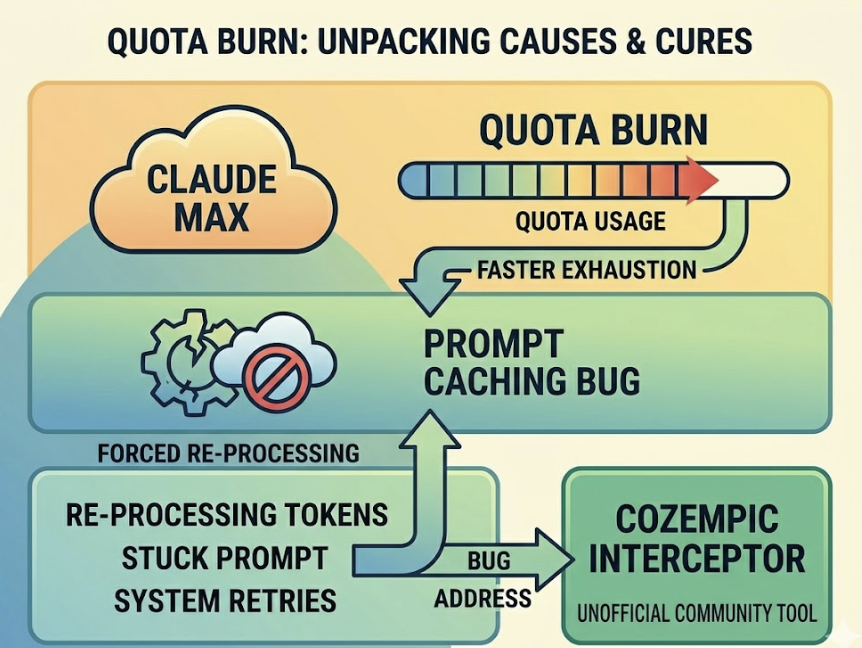
    Quota burn. On Claude Max plans, sessions have been reported to exhaust faster than expected. The cause is typically a bug in the prompt caching mechanism that forces the system to re-process tokens it should have cached. Community tools like the Cozempic interceptor exist to address this, though they’re unofficial.

    Conflicting edits. If Claude undoes its own previous work, the issue is usually an ambiguous rule in CLAUDE.md. Keep the instructions specific and non-overlapping.

    Deploy: Local to Live in 3 Steps

    Claude Code can’t click through a cloud dashboard. It can run CLI commands.

    With the Railway plugin installed, deployment is a single instruction:

    “Deploy this task manager to Railway and verify the staging environment.”

    The plugin provides a use-railway agent skill that covers project setup, service linking, environment variable injection, and build log monitoring. A PreToolUse hook automatically approves Railway CLI commands, so Claude executes the full deployment without prompting you at each step.

    What Claude handles:

    • railway init, railway up, railway logs
    • Setting DATABASE_URL and PORT as environment variables
    • Checking that the health endpoint returns 200

    What it still can’t do: set up a custom domain through the dashboard. That one’s manual.

    Note on Routines. Anthropic introduced scheduled automation in April 2026. Routines let you run agentic tasks on a schedule or triggered by GitHub events, on Anthropic’s infrastructure, with no local terminal required. Nightly database backups, automated PR reviews, periodic health checks. This moves Claude Code from personal tool to CI/CD component.

    Is Claude Code Worth Switching To?

    Depends on what you’re switching from.

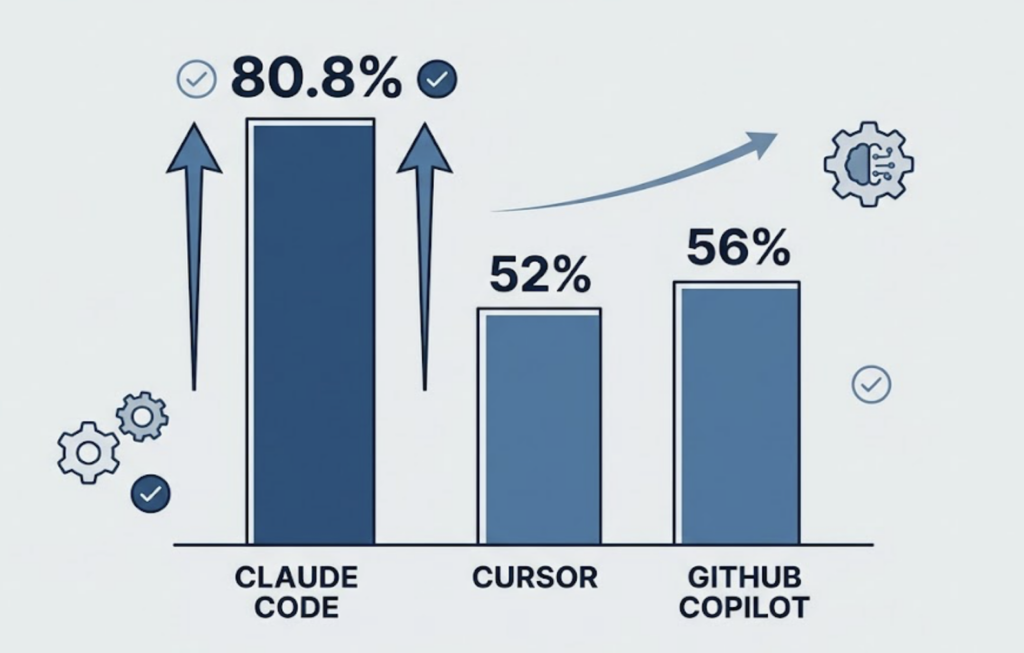
    On the SWE-bench Verified benchmark, a standardized test of real-world software engineering problem resolution, Claude Code scores 80.8%. Cursor’s Composer mode sits around 52%, GitHub Copilot around 56%. The gap is large enough to matter for complex, multi-file work.

    For inline autocomplete during daily coding, Cursor is still faster and more ergonomic. Its Supermaven integration and visual diff view are hard to match in a terminal interface.

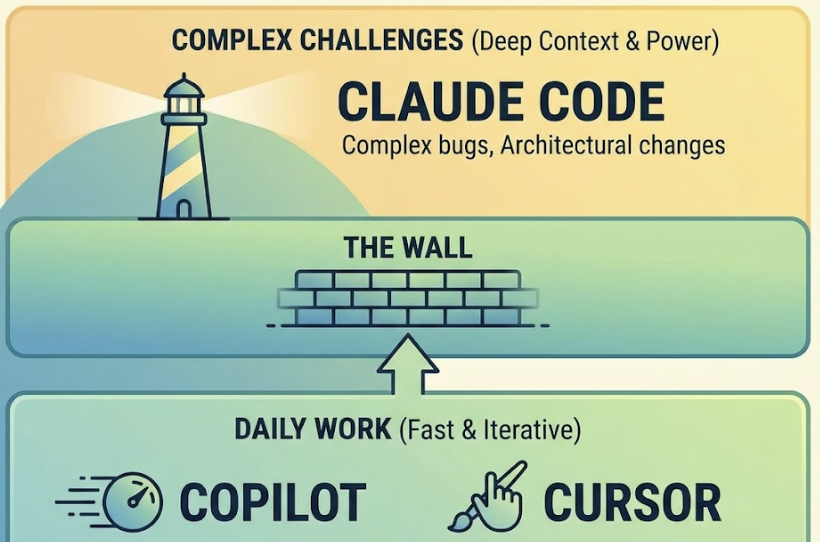
    The workflow that most professional developers land on: use Cursor or Copilot for routine editing, switch to Claude Code for anything requiring multi-file coordination, architecture changes, or debugging logic that spans several layers.

    Use CaseBest Tool
    Inline autocompleteCursor
    Boilerplate generationGitHub Copilot
    Multi-file refactoringClaude Code
    Large-scale migrationsClaude Code
    Visual diff reviewCursor
    Autonomous deployment tasksClaude Code

    That’s not a competition. It’s a division of labor.

    Conclusion

    Claude Code isn’t a better autocomplete. It’s a different category of tool.

    The full-stack task manager in this tutorial took under 10 minutes to scaffold because the agent planned before it wrote, ran its own tests, and fixed its own mistakes. That loop, repeated across a real project, compresses timelines in ways that add up fast.

    The setup steps matter. CLAUDE.md, .claudeignore, and acceptEdits aren’t optional polish. They’re what separates a productive session from one that burns quota and loops.

    Start with a bounded project. Watch the planning phase. Then adjust from there.

    FAQ

    Does Claude Code work offline? 

    No. It requires an active internet connection for model inference. Community integrations with local models like Qwen 2.5 Coder via Ollama exist, but performance varies depending on local hardware.

    Can it handle TypeScript, Python, and other stacks? 

    Yes. Claude Code is language-agnostic. It’s particularly strong with TypeScript and Python due to training data density, but it has been used for large-scale migrations in Go and Scala as well.

    How does it compare to Cursor’s Agent Mode? 

    Cursor’s Agent Mode is editor-integrated with visual diffs. Claude Code is terminal-native and better suited for tasks requiring shell execution, background processes, and deep codebase reasoning. Claude Code scores higher on engineering benchmarks; Cursor offers a more visual development experience.

    Is there a free tier? 

    No. Claude Code requires a paid subscription: Pro, Max, or Team, or a Console account with pre-paid credits. Unofficial free usage is possible by connecting to local open-source models via Ollama.

    Read More

  • Claude Code vs Copilot vs Cursor: Pick One

    Claude Code vs Copilot vs Cursor: Pick One

    Most developers don’t actually pick one AI coding tool. They install three, commit to two, and quietly rely on one for 80% of their work.

    That’s not indecision. It reflects how genuinely different these tools are under the hood. Claude Code, GitHub Copilot, and Cursor each made a different architectural bet in 2026. Understanding those bets is the fastest path to figuring out which one deserves the center slot in your workflow.

    Three Bets, Three Philosophies

    The race for your primary workspace isn’t just a model quality contest. It’s a fight between fundamentally different ideas about where AI belongs in the development stack.

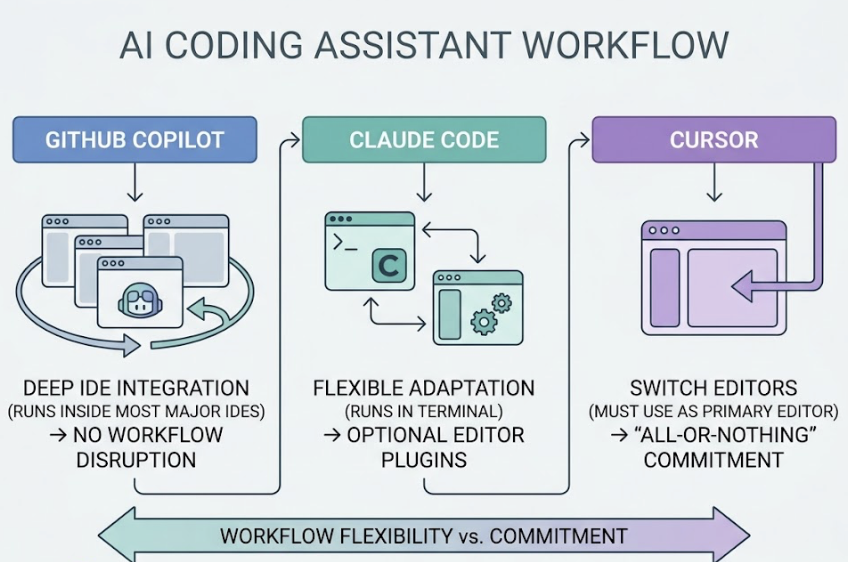
    Claude Code bets on the terminal. It’s a CLI-native agent built for delegation: write code, run tests, execute shell commands, and manage Git operations without leaving the command line. The core thesis is that complex, multi-file refactors need an agent that can interact with the entire OS environment, not just the text editor.

    GitHub Copilot bets on ubiquity. Rather than asking developers to change anything, it layers a high-fidelity AI experience over whichever IDE you’re already using. VS Code, JetBrains, Xcode, Visual Studio, it doesn’t matter. By 2026, Copilot has evolved into a multi-model gateway, letting teams toggle between GPT-5, Claude 4.6, and Gemini 3 Pro inside a single familiar interface.

    Cursor bets on ownership. By forking VS Code entirely, Anysphere gained control over the editor’s internal state, something an extension API can never provide. That control powers Composer 2, which lets the AI manipulate the file tree, terminal, and code editor simultaneously with a coordination level that plugins simply can’t match.

    Same goal: help you ship faster. Completely different approaches.

    The 5 Metrics That Actually Determine Daily Value

    Code Completion Speed and Accuracy

    Latency kills flow. Cursor’s “Supermaven” integration and proprietary Tab models lead the market here, with an acceptance rate as high as 72% and multi-line predictions that often finish a thought before you do. Copilot uses lightweight, speed-optimized models for inline completions that remain highly competitive. Claude Code doesn’t offer traditional ghost-text autocompletion at all. It focuses on larger-scale generation through prompts, not character-by-character assistance.

    If your primary need is fast in-editor autocomplete, Cursor or Copilot wins this round. Claude Code isn’t playing the same game.

    Multi-File Context and Codebase Awareness

    This is where the real divergence shows up.

    FeatureClaude CodeGitHub CopilotCursor
    Native Context1,000,000 tokens (Opus 4.6)128K–200K (typical)200,000 tokens
    Indexing StrategySequential / Summary CachingWorkspace / Issue IndexingSemantic Vector Indexing (RAG)
    Multi-File Editing50+ files (reasoning-based)Limited (extension API)High (Composer 2)

    Claude Code leads in raw reasoning across massive codebases. Its 1M token context window with Context Compaction lets it maintain coherence across extended refactor sessions in a way the other two can’t match. Cursor compensates through local semantic indexing, vectorizing your entire codebase so the AI can locate a relevant file in a large monorepo in milliseconds, without needing every file open.

    Two different approaches to the same problem. Both are genuinely good. Which one fits depends on whether your codebase is massive-and-sprawling or large-and-well-indexed.

    Agent Mode: Can It Actually Execute End-to-End?

    Agent mode has moved from buzzword to functional requirement. All three tools have it. Only one has made it the core product.

    Claude Code’s agent runs an autonomous edit-test-fix loop until a goal is met. The “Agent Teams” feature fans out sub-tasks to parallel Claude instances, where one agent writes tests while another writes documentation, then merges everything into a single commit. It’s the most ambitious agentic architecture of the three.

    Cursor’s Cloud Agents run on remote infrastructure, which solves thermal throttling on local hardware during intensive sessions. Copilot’s Coding Agent is uniquely optimized for the GitHub issue-to-PR pipeline, the most efficient workflow specifically for teams using GitHub as their project management layer.

    For raw autonomous execution on complex engineering tasks, Claude Code is the current frontier.

    IDE Flexibility vs. Lock-in

    Copilot wins here by a wide margin. It runs inside almost every major IDE with no workflow disruption. Claude Code is also flexible, running alongside any editor in the terminal, with official VS Code and JetBrains plugins to smooth the experience. Cursor, however, is an all-or-nothing commitment. You can’t use its deepest features without switching to it as your primary editor.

    Pricing for Solo Devs vs. Teams

    TierClaude CodeGitHub CopilotCursor
    Pro (Individual)$20/month$10/month$20/month
    Power User$100–$200/month$39/month (Pro+)$60–$200/month
    Business (per seat)$100/seat$19/seat$40/seat

    Copilot is the clear price leader at $10/month for individuals. The Claude Code Max plan at $200/month is notably the most cost-efficient path for heavy API users: the subscription can be up to 93% cheaper than paying raw API costs at equivalent token volumes. For developers running agents 8+ hours a day, that math changes the decision entirely.

    Where Claude Code Actually Pulls Ahead

    Claude Code has carved out a specific niche: high-complexity reasoning tasks that break other tools.

    On the SWE-bench Verified benchmark, the industry standard for real-world software engineering, Claude Code scored 80.8%. That’s the highest recorded for any tool in its class as of 2026. Not a marginal advantage.

    The terminal-native workflow removes the UI abstractions that slow down large refactors. The “Spec-first” approach, where Claude generates a markdown plan for the developer to review before a single line changes, reduces the risk of irreversible bulk edits. For architectural migrations or bugs that require reasoning across 50+ files, the Opus 4.6 model’s reasoning capacity is the deciding factor.

    The honest weakness is the learning curve. You need to get comfortable with CLI navigation, commands like /compact, /clear, and /rewind, and a text-based workflow. Developers who rely on visual UI builders or drag-and-drop IDE features will find it restrictive.

    The Copilot Workflow Nobody Talks About Enough

    Despite the momentum behind Cursor and Claude Code, Copilot maintains a genuine moat that’s easy to overlook: the issue-to-PR pipeline.

    Assign a GitHub issue to Copilot’s Coding Agent directly from the browser. It clones the repo into a secure GitHub Actions VM, implements the fix, runs the existing test suite, and opens a draft PR with a summary of changes. No IDE required. No specific developer workflow needed. For maintenance work and bug fixes on existing codebases, this hands-off automation is a significant time saver.

    There’s also a compliance angle. Microsoft’s Customer Copyright Commitment provides IP indemnity that smaller startups like Anysphere can’t yet match at enterprise scale. For legal teams signing off on procurement, that assurance is often the deciding factor, regardless of feature parity.

    What Cursor Gets Right That Others Can’t Copy

    Cursor’s differentiation isn’t the underlying model. Users can load the same Claude 4.6 or GPT-4o models in Cursor. The edge is environment control.

    Because Cursor owns the fork, it built the Autonomy Slider into Composer 2: a per-session setting that lets developers choose exactly how independently the AI operates. At low autonomy, every suggestion requires approval. At high autonomy, the AI searches the codebase, runs terminal commands, executes tests, and self-corrects until the task is done. That level of UI-level control is only possible because they own the editor.

    The local semantic indexing is also a meaningful practical advantage. Cursor builds an intelligent catalog of your project, understanding cross-file dependencies like how a change in a React component affects a CSS-in-JS utility, without needing every file open. Combined with Supermaven’s autocomplete speed, this makes Cursor the tool most likely to keep a developer in flow state during frontend and iterative UI work.

    How to Choose Based on Your Actual Workflow

    Stop asking which tool is best. Start asking which tool fits the specific work you actually do.

    ScenarioRecommended ToolWhy
    Solo dev, large monorepoClaude Code80.8% SWE-bench; handles 1M token context across 50+ files
    Enterprise team on GitHubGitHub Copilot$19/seat, IP indemnity, issue-to-PR automation
    Rapid prototyping / frontendCursorComposer 2 + Autonomy Slider, fastest path from idea to working feature
    Budget under $20/monthCopilot Pro$10/month, unlimited autocomplete, 300 premium requests
    Power user, agent-heavyClaude Code Max$200/month avoids per-token API costs for 8+ hour daily agent sessions

    No tool dominates every row. The “best” one is whichever one matches your row.

    Can You Use All Three? The Honest Answer

    Yes, and increasingly, experienced developers do.

    The emerging pattern is tool layering, not tool replacing. A practical 2026 hybrid stack looks like this: Copilot for fast single-file autocompletion, Cursor for iterative feature builds and UI work, and Claude Code when you hit a wall that the other two can’t break through. A 50-file bug trace, a race condition in a complex backend, an architectural migration with cascading dependencies — that’s where 80.8% SWE-bench accuracy starts to matter.

    The combined cost runs roughly $40–60/month. Senior engineers consistently frame that as a negligible expense against the 10–20 hours of manual work saved weekly.

    Pick your primary tool based on the work you do most. Add the others for the situations where your primary falls short.

    One Thing AI Coding Tools Don’t Solve

    These tools help you ship faster. But once you’ve shipped, a different challenge begins: making sure what you built actually gets recommended by AI systems like ChatGPT, Perplexity, and Gemini.

    That’s a separate problem from development speed. It’s about how AI search engines discover, evaluate, and recommend products. Platforms like Topify track exactly that, monitoring how AI platforms mention your brand and where you rank against competitors in AI-generated answers. It’s the layer that kicks in after the code is deployed.

    Conclusion

    The three tools in this comparison aren’t competing for the same developer. Claude Code is for the developer who needs to reason through the hardest problems in the codebase. Copilot is for the team that needs to move fast, stay compliant, and not disrupt existing workflows. Cursor is for the developer who wants the most immersive AI-native editing environment available.

    You don’t need to pick one and only one. You need to know which one leads.

    Start with the scenario table above. The tool that matches your most common work context is your primary. The others become situational. That’s the 2026 approach: not replacing, layering.


    FAQ

    Q: Is Claude Code free?

    A: No. Claude Code requires a Claude Pro ($20/month), Max ($100–$200/month), or pay-as-you-go API subscription. New API users typically receive $5 in trial credits, but there’s no permanent free tier.

    Q: Does Claude Code work inside VS Code?

    A: Yes. There’s an official VS Code extension that connects to the Claude CLI. It provides visual diffs, file-sharing, and terminal integration without leaving VS Code, though the core interaction remains text-based.

    Q: Cursor vs. Copilot: which is cheaper for teams?

    A: GitHub Copilot is significantly cheaper at $19 per user per month for the Business plan. Cursor Business runs $40 per seat. For a 10-person team, Copilot saves over $2,500 annually before considering any feature tradeoffs.

    Q: Can Claude Code replace Cursor entirely?

    A: For CLI-first developers who prioritize reasoning accuracy over in-editor autocomplete, yes. For frontend-heavy work and rapid prototyping, Cursor’s Composer 2, visual diffs, and Supermaven autocomplete provide a more integrated experience that Claude Code doesn’t replicate.


    Read More

  • Claude Code for Beginners: From Setup to First AI Task

    Claude Code for Beginners: From Setup to First AI Task

    Most developers spend their first hour with Claude Code doing the wrong thing. They paste a snippet, get a response, and think: “This is just a fancier chatbot.” It’s not. That mental model is exactly what makes the first week frustrating.

    Claude Code is a terminal-native agent. It lives in your project, reads your files, runs your tests, and executes shell commands. The faster you stop treating it like a chat interface, the faster it starts doing work that actually matters.

    Here’s how to install it correctly, avoid the setup traps, and run your first task that’s worth running.

    What Claude Code Actually Does (and What It Doesn’t)

    Claude Code isn’t another autocomplete tool. It doesn’t suggest the next line of code while you type.

    It’s designed for delegation. You hand it a task that spans multiple files, a decision that requires understanding your project’s architecture, and let it work. Its context window handles up to 1 million tokens, which means it can hold a large codebase in view simultaneously. That’s the core capability that separates it from IDE extensions like GitHub Copilot, which typically work within a 8k–32k token range focused on the current file.

    The trade-off: because it operates via the terminal, there’s no visual IDE layer. You’re working with commands, not clicks.

    DimensionIDE Extension (e.g., Copilot)Claude Code
    InterfaceInline ghost text / sidebarTerminal CLI
    Data accessCurrent file + open tabsFull repository + local tools
    AutonomyModerate (suggestions)High (autonomous execution)
    Context window8k–32k tokens1M tokens
    Primary valueAutocomplete / boilerplateComplex delegation / debugging

    Bottom line: if your task fits in one file, Copilot is probably faster. If it crosses multiple files, requires understanding patterns, or involves running commands, Claude Code is built for it.

    Before You Install: 3 Things You Check First

    Skipping this step is the #1 reason new users hit a wall on day one.

    Node.js version. Claude Code requires Node.js 18.0.0 or higher. The recommended path is to install via Node Version Manager (NVM), not through a system package manager. Global npm installs often create permission errors that are tedious to debug later.

    Operating system compatibility. macOS 13.0+ and Ubuntu 20.04+ / Debian 10+ work natively. Windows doesn’t. Claude Code relies on POSIX-compliant system calls, so Windows users need WSL2 (Windows Subsystem for Linux 2). Virtualization must be enabled in BIOS/UEFI for WSL2 to run properly. That’s a restart-and-check step that’s easy to forget.

    API access. The CLI binary is free to install, but running it requires an active Anthropic account. A Claude Pro, Max, Team, or Enterprise plan works for individual use. For CI/CD pipelines or team-wide automation, a Console account with pre-paid credits gives better cost visibility.

    One more check: minimum specs

    ComponentMinimumRecommended
    RAM4 GB16 GB+ for large monorepos
    Disk space2–4 GB10 GB+ if using WSL2
    Node.jsv18.0.0Latest LTS (v20+)

    Get these confirmed before touching the installer.

    Installing Claude Code in Under 5 Minutes

    macOS and Linux share a single installation path:

    curl -fsSL https://claude.ai/install.sh | bash
    

    This downloads the architecture-specific binary and places it in ~/.local/bin/. After installation, run claude --version to confirm it’s recognized.

    If the shell returns “command not found,” the issue is almost always a PATH problem. Run:

    echo 'export PATH="$HOME/.local/bin:$PATH"' >> ~/.zshrc
    source ~/.zshrc
    

    The built-in diagnostic tool claude doctor identifies configuration gaps automatically. That’s your first stop if anything feels off.

    Windows via WSL2 is a multi-step process:

    1. Open PowerShell as Administrator and run wsl --install, then restart.
    2. After restart, open your WSL terminal (Ubuntu is the default distro).
    3. Inside WSL, install Node.js and Git independently. Your Windows-side installations don’t carry over.
    4. Run the same curl installer from inside the WSL terminal.

    One detail that matters for performance: clone your projects into the WSL-native filesystem (~/projects/), not the Windows mount (/mnt/c/). File I/O across the mount is significantly slower, which affects how fast Claude Code scans your repository.

    Verify your installation:

    claude --version
    claude doctor
    

    Both should return clean output. If claude doctor flags anything, fix it before moving on. Starting with a broken setup makes everything harder to debug later.

    Your First Real Task: Don’t Start with “Hello World”

    Toy examples don’t demonstrate what Claude Code actually does. “Write a function that adds two numbers” tells you nothing about whether the agent understands your codebase.

    Start with something real.

    Three task types consistently show the tool’s core capability:

    Scenario A: Add an API endpoint Prompt: “Add a new GET endpoint to the analytics module that returns daily active users. Follow the pattern used in the users module. Write a corresponding integration test.”

    Claude Code will find your existing controller patterns, match your database abstraction layer, implement the route, and run the test suite to verify. It’s not generating isolated code. It’s reading your conventions and matching them.

    Scenario B: Systemic refactor Prompt: “Refactor the callback-based authentication middleware in /auth to use async/await. Update all call sites.”

    The agent performs a search across the full project, applies the change everywhere, and runs a build check. A task that’s typically high-risk for manual developers, done with a single prompt.

    Scenario C: Error triage from a log

    cat error.log | claude "Locate this bug, write a reproduction test, and implement a fix."
    

    By piping the log directly, you give the agent high-signal context. It traces the error through source files and verifies the fix with the new test. That closed loop—where the agent sees the output of its own changes—is the core behavior that makes it useful in production environments.

    Write prompts with clear success criteria

    Generic prompts produce generic results. The difference:

    Standard promptOptimized prompt
    “Fix the auth bug.”“Locate the session timeout issue in src/auth/session.ts. Check for race conditions.”
    “Check if it works.”“Write a failing Jest test, fix the code, and run only that test to confirm.”
    “Refactor it.”“Refactor for readability without changing the public API or adding new dependencies.”

    You’re not chatting with Claude Code. You’re delegating to it. The prompt is the job spec.

    5 Mistakes Beginners Make in the First Week

    These aren’t edge cases. Nearly every new user hits at least three of them.

    1. Giving it too much context at once. Dumping your entire codebase into a single session without a .claudeignore file means the agent spends tokens on node_modules, build artifacts, and test fixtures. Excluding irrelevant directories can cut context consumption by over 90% in large repos.

    2. Skipping context cleanup between tasks. AI context works best when it’s fresh and scoped. Use /clear between unrelated tasks, or /compact to generate a session summary before continuing. Don’t carry over stale context from a debugging session into a new feature build.

    3. Not reviewing the diff before accepting changes. Claude Code can modify multiple files in a single operation. Use Plan Mode (Shift+Tab) to let the agent explore and propose a plan without making changes. Review the plan, then execute.

    4. Working in the wrong directory. On Windows/WSL, this is especially common. If you’re running Claude Code from /mnt/c/, file scanning is slow and unreliable. Always work from the WSL-native path.

    5. Ignoring silent fake success. Agentic tools sometimes implement solutions that appear to work but contain hidden fallbacks or hardcoded values. Set a “Fail Loud” philosophy in your CLAUDE.md project file: the agent should surface errors with full stack traces rather than failing silently. A crashed system with a clear error is more valuable than a degraded one with no signal.

    Where Claude Code Fits in Your Actual Workflow

    After the first week, the question shifts from “how do I use this” to “where does this actually save time.”

    The honest answer: Claude Code earns its place in tasks that require codebase-wide reasoning. Single-file autocomplete, simple boilerplate, quick syntax lookups—other tools handle those faster. But multi-file refactors, cross-cutting debugging, and automated test generation are where the 1M-token context window pays off.

    As developer workflows become more agent-driven, a parallel challenge emerges: if your product or API is being recommended by AI tools like Claude Code, you need to know how it’s being described and whether that description is accurate. That’s where AI visibility tracking comes in.

    Topify is a platform built specifically for this. It tracks how brands, libraries, and developer tools appear across AI systems like ChatGPT, Gemini, and Perplexity. For teams building APIs or developer products, Topify’s Source Analysis identifies which domains AI systems are citing as references, and Sentiment Analysis tracks whether the tool is being described accurately or with outdated information.

    The practical application: if Topify detects that Claude Code is recommending a deprecated version of your API, your team can use Claude Code itself to update the documentation schema, which then feeds back into how AI systems reference your product. It closes the loop between building and being discovered.

    Conclusion

    Getting Claude Code running is the easy part. Getting value from it depends on three habits that take a week to build: checking your environment before installation, starting with real tasks that require codebase reasoning, and managing context aggressively with .claudeignore and session pruning.

    The tool rewards developers who treat it like a capable junior engineer. Give it a specific task, clear success criteria, and the permission to run commands. Then review what it did.

    That’s the entire model. Everything else is practice.


    FAQ

    Is Claude Code free to use? 

    The CLI binary itself is open-source, but usage requires an active Anthropic account. Claude Pro, Max, Team, and Enterprise plans all work for interactive use. For automated tasks or CI/CD pipelines, a Console account with pre-paid API credits is typically more cost-effective.

    Does Claude Code work offline? 

    No. The filesystem interactions and command execution happen locally, but the reasoning runs on Anthropic’s servers. An internet connection is required for every session.

    How is Claude Code different from GitHub Copilot? 

    Copilot is an IDE extension focused on inline autocomplete. Claude Code is a terminal agent designed to work across an entire codebase. Copilot suggests lines; Claude Code can be tasked with finding a bug, writing a test, fixing it, and committing, all in one interaction.

    Can non-developers use Claude Code? 

    Yes, with caveats. The natural-language interface makes it accessible to founders and product managers who want to build prototypes. But it’s a CLI tool, so basic familiarity with the terminal, Node.js, and Git is still required to get it running.

    What does .claudeignore actually do? 

    It tells the agent which directories to skip during file scanning. Excluding node_modules, build outputs, and large data fixtures keeps the context window lean, improves reasoning speed, and reduces unnecessary API token usage.

    Read More

  • Track and Improve Your Brand in Google AI Overviews

    Track and Improve Your Brand in Google AI Overviews

    Your brand ranks #1 for a high-intent keyword. But when someone searches that query, Google summarizes an answer at the top of the page and your brand isn’t in it.

    That’s the visibility gap. And most teams don’t catch it until traffic has already dropped.

    Organic click-through rates have fallen 61% for queries where an AI Overview is present, according to longitudinal data tracking the shift from 2024 to 2026. Meanwhile, 69% of Google searches now end without a single click to any external site. The implication is clear: if you’re not being cited in the summary, you’re largely invisible.

    This guide walks through how to track where your brand stands in Google AI Overviews today, diagnose why you might be missing, and execute the optimizations that actually move the needle.


    Rankings Alone Won’t Tell You If You’re in AI Overviews

    This is the single most important thing to internalize before you do anything else.

    Traditional rank tracking tools tell you where your page sits in the blue-link results. They don’t tell you whether your brand appears in the synthesized answer above those results. And as of 2026, that synthesized answer is often the only part of the SERP a user actually reads.

    The overlap between top-10 organic rankings and AI Overview citations has collapsed. In 2024, roughly 76% of AI Overview citations were pulled from the top-10 organic results. That figure now sits somewhere between 17% and 38%, meaning the majority of citations are coming from pages outside the traditional first page.

    Pages ranking in positions 11 to 100 capture approximately 31% of AI Overview citation slots. Pages outside the top 100 account for another 31%.

    That’s a completely different game. And playing it requires a completely different set of metrics.


    The 5 Signals That Actually Measure AI Overviews Performance

    Before tracking, you need to know what to track. These are the metrics that matter for AI Overviews optimization specifically.

    Visibility Rate (Inclusion Rate): The percentage of relevant prompts where your brand appears in the AI-generated answer. AI outputs are probabilistic, not fixed. Only 30% of brands maintain consistent visibility across multiple regenerations of the same query. That means visibility must be measured as a probability score across multiple runs, not a single manual check.

    Sentiment Score: How the AI characterizes your brand when it does mention you. Is it framing you as a leading option, a budget alternative, or a niche pick? The framing matters almost as much as the inclusion.

    Position Index: Where in the narrative your brand appears. First recommendation correlates with meaningfully stronger downstream engagement than being mentioned third or fourth.

    Citation Source Attribution: Whether AI is linking to your own content or citing third-party platforms like Reddit or Wikipedia to validate your existence. High mentions with low direct citations signal a content-authority mismatch.

    CVR (Conversion Visibility Rate): This is the downstream metric. Visitors arriving from AI Overview citations convert at dramatically higher rates than traditional organic traffic. One Ahrefs study found AI search visitors convert at 23x the rate of standard organic visitors. You want to know how often AI recommendations are translating into actual site visits.


    Step 1: Audit Your Current AI Overviews Visibility

    Start with a baseline. You can’t track improvement without knowing where you stand.

    The manual method: Open Google in an incognito window. Run 15 to 20 conversational queries that represent how your target customers would describe their problems, not keyword-style queries. Note whether an AI Overview appears, and whether your brand or your content is cited in it.

    Question-format queries trigger AI Overviews at an 88% to 91% rate. Long-tail queries of seven or more words trigger them at 46.4%. Short navigational queries, on the other hand, trigger them less than 10% of the time. Your audit prompts should skew toward the first category.

    The limitation of manual audits is significant: you can only check a handful of prompts, and AI outputs are non-deterministic, meaning the same query can produce different citations across runs.

    The tool-based method: Platforms like Topify automate this at scale. Topify runs hundreds of prompt variations across ChatGPT, Gemini, Perplexity, and Google AI Overviews, giving you a statistical baseline of your inclusion rate rather than a snapshot. The Visibility Tracking feature shows you where your brand appears, how consistently, and which prompts are driving or missing citations.

    That probabilistic view is what makes tool-based tracking meaningful for ongoing measurement.


    Step 2: Map the Prompts That Trigger AI Overview Citations in Your Category

    Most brands optimize for the wrong inputs. They focus on high-volume keywords when over 80% of AI prompts are phrased as context-rich, conversational queries.

    A traditional search might be “email marketing tool.” A generative search prompt is more likely “which email marketing tool is best for a 50-person SaaS team with a $500 monthly budget.” Those are completely different inputs, and they surface different citations.

    Prompt mapping means identifying the specific conversational questions that trigger AI Overviews in your category, and then checking whether your brand, your competitors, or third-party sites are appearing in those answers.

    For B2B tech brands, this matters more than almost any other sector. AI Overviews appear for over 70% of technology queries in the US, and the buyer journeys they support are exactly the high-intent, research-heavy paths where brand positioning is decisive.

    The goal is to build a prompt matrix: a structured set of 40 to 100 prompts covering the key questions your buyers are asking at each stage of evaluation. Topify’s High-Value Prompt Discovery feature surfaces these automatically, flagging prompts that are generating AI Overview appearances in your category that your brand isn’t winning.


    Step 3: Diagnose Why You’re Not Being Cited

    If you’re ranking well but absent from AI Overviews, you’re dealing with a citation source gap. Here’s how to diagnose it.

    Check which domains are being cited instead of you. AI platforms have a clear hierarchy of trust. Google AI Overviews frequently cite Reddit (2.2% of citations), YouTube (1.9%), and Quora (1.5%), alongside brand-owned content. If competitors are being cited via these platforms and you’re not present there, the gap is one of authority distribution, not just content quality.

    Evaluate your content’s extractability. Research shows that 55% of AI Overview citations come from the first 30% of a document, with the highest citation probability (27%) concentrated between the 10% and 20% mark. If your primary answer to a query is buried in paragraph six, the AI’s retrieval system is likely skipping past it.

    Assess your entity authority. AI models evaluate content through semantic understanding of who a brand is and what it’s authoritative on. If your brand has an inconsistent presence across structured data, third-party domains, and the Google Knowledge Graph, the AI system has lower confidence in citing you. A gap in citations often reflects a gap in corroboration, not a gap in expertise.

    Topify’s Source Analysis feature shows you exactly which domains AI is pulling from for the prompts in your category. That’s the diagnostic layer most manual workflows can’t replicate.


    Step 4: Close the Gaps with a Targeted Optimization Playbook

    Once you know what’s missing, there’s a specific set of actions that move the needle.

    Front-load your answers. Every high-priority page should open with a 50 to 70 word direct answer to the primary query it targets, within the first 150 words. This is not about keywords; it’s about giving the AI a clean, pre-summarized block it can extract. The drop-off in citation probability after the first third of a page is steep, and recovery later in the document is limited unless you’re using FAQ sections.

    Implement schema markup. Basic schema is a minimum, not a differentiator. FAQ page schema increases citation likelihood by 60%, according to available benchmarks. Schema markup overall has been associated with a 73% boost in AI Overview selection probability. For brands in B2B SaaS or tech, this is one of the fastest wins available.

    Build entity authority through third-party platforms. If AI systems are citing Reddit and YouTube to validate brand claims in your category, your presence on those platforms isn’t a social media strategy, it’s an AI visibility strategy. Unlinked mentions and community-level engagement on high-authority domains signal to AI models that a brand exists and is trusted beyond its own site.

    Use entity linking. Connecting on-page mentions to external knowledge bases like Wikidata has been shown to increase AI Overview visibility by 19.72%. It reduces the semantic ambiguity that causes AI systems to skip over content they’d otherwise trust.

    Produce original data. Content that aggregates existing information is increasingly deprioritized. Original research and proprietary data show a 40% higher citability rate than generic content. Even small-scale original surveys or internal data publications help here.

    Optimization TacticImpactTimeline
    Schema Markup Implementation+73% selection boost1–4 weeks
    150-word Direct Answer Lead55% of citations from top 30% of page4–8 weeks
    FAQ Page Schema+60% citation likelihood1–4 weeks
    Entity Linking+19.72% visibility lift4–8 weeks
    Original Research / Data+40% citability rate3–4 months

    Step 5: Measure Whether It’s Working

    The timeline for AI Overviews optimization is faster than traditional SEO, but the measurement approach has to be different.

    Initial visibility changes can appear within 2 to 4 weeks following a structural content update or schema implementation. This is meaningfully faster than the 3 to 6 months typically associated with standard organic ranking shifts. That said, authority-building tactics like digital PR, earned media, and YouTube presence take 3 to 6 months to translate into sustained citation improvement.

    What to measure week-over-week:

    Your Visibility Rate should be tracked across a fixed set of 40 to 100 representative prompts, run multiple times each to account for the probabilistic nature of AI outputs. A single run per query will give you noisy data. The baseline you need is a statistical inclusion rate, not a snapshot.

    Track your Sentiment Score alongside visibility. A brand can appear in AI Overviews while being characterized unfavorably, and that framing affects downstream behavior in ways that standard analytics won’t surface.

    Monitor citation source shifts. If the AI starts pulling from your own content rather than third-party domains to validate your brand, that’s a signal that entity authority is building.

    And watch the conversion data. Because AI Overview visitors are highly pre-qualified, a relatively small increase in citation frequency can produce an outsized revenue impact. The 23x conversion lift makes even modest visibility gains worth tracking precisely.


    Conclusion

    Google AI Overviews have broken the historical relationship between ranking and visibility. A first-position ranking no longer guarantees inclusion in the synthesized answer that most users actually read.

    The brands that close this gap are the ones that treat AI Overviews as a distinct measurement and optimization challenge, not a side effect of traditional SEO. That means tracking inclusion probability across prompt sets, diagnosing citation source gaps, restructuring content for extractability, and building entity authority across both owned and third-party channels.

    The citation premium is real: brands cited in AI Overviews earn 35% more organic clicks and 91% more paid clicks than non-cited competitors. And the downstream traffic quality is fundamentally different.

    Start with your baseline. Run your audit. Then fix what’s actually missing.


    FAQ

    How often does Google change its AI Overview citations? 

    Volatility varies significantly by industry. Finance queries can see weekly citation turnover as Google tightens quality filters. Healthcare and B2B tech tend to be more stable. This is why ongoing measurement matters more than periodic audits. A citation you earned this month may not persist next month without continued optimization.

    Can I optimize for AI Overviews without changing my core SEO strategy? 

    You can do both in parallel, but they’re not the same. Traditional SEO focuses on PageRank signals and keyword density. AI Overviews optimization focuses on content extractability, entity authority, and schema implementation. Tactics like front-loading answers and FAQ schema support both goals. Tactics like entity linking are specific to the AI layer.

    How do I identify which competitors are winning AI Overview placements in my category? 

    Manual competitive checks give you partial visibility but won’t scale. A structured approach runs the same prompt set against your competitor brand names and compares inclusion rates, position, and sentiment scores. Topify’s Competitor Monitoring feature automates this comparison, showing you how your visibility rate, position index, and sentiment score stack up against specific competitors across the same prompt matrix.

    Is AI Overviews optimization different from GEO (Generative Engine Optimization)? 

    Related but not identical. AI Overviews Optimization refers specifically to Google’s AI-generated summary feature at the top of search results. GEO is a broader discipline covering how brands appear across all generative AI systems, including ChatGPT, Perplexity, and Gemini. The content and technical principles overlap significantly, but GEO involves prompt tracking across multiple platforms, not just Google.


    Read More

  • 6 Signals That Decide If Google AI Overviews Cites You

    6 Signals That Decide If Google AI Overviews Cites You

    Most brands are still optimizing for rankings. That’s no longer enough.

    Google AI Overviews now trigger on approximately 48% of all tracked queries, up 58% year-over-year. When an AI Overview is present, organic CTR for informational queries drops 61%, from 1.76% to 0.61%. Even the first organic position loses 58% of its clicks.

    Being cited in the AI Overview isn’t a bonus. It’s often the only way to stay visible at all.

    Here’s the part most SEO playbooks miss: AI Overviews doesn’t select sources the same way Google’s ranking algorithm does. It runs on a separate extraction logic that rewards a specific set of content signals. Get those signals right, and your brand gets cited. Miss them, and you’re invisible, regardless of where you rank.

    These are the six signals that actually determine whether you make the cut.

    AI Overviews Doesn’t Just Pull From Page One. It Pulls From Pages That Answer Directly.

    About 76.1% of URLs cited in AI Overviews do rank in Google’s top 10. So yes, authority still matters. But ranking alone doesn’t get you cited.

    The filter that comes after ranking is extractability: can Google’s generative parser pull a clean, self-contained answer from your page without needing to read the whole thing? If the answer to a query is buried in paragraph six after 300 words of preamble, the AI will skip your page and pull from the one that leads with the answer.

    That’s the gap most brands can’t see in their analytics.

    Signal 1: Your Content Answers the Query in the First Sentence, Not the Fifth

    AI Overviews are built on RAG (Retrieval-Augmented Generation). The system retrieves candidate passages and evaluates which one most directly satisfies the query intent. It’s looking for a 40-60 word answer block it can extract and synthesize without much interpretation.

    If your H2 sections start with background context, history, or “in this section we’ll cover,” you’re training the parser to skip you.

    Rewrite every major section so the first sentence delivers the answer. The supporting evidence comes after.

    This is the “Inverted Pyramid” format: conclusion first, reasoning second. It feels unnatural for traditional editorial writing. For AI extraction, it’s non-negotiable.

    Signal 2: Other Sites Talk About You. You Don’t Just Talk About Yourself.

    Here’s the thing: AI models don’t trust brands that describe themselves. They trust brands that are described by others.

    Sites with over 32,000 referring domains are 3.5x more likely to be cited by major AI systems than lower-authority sites. That number reflects the same trust logic that drives AI citation decisions. A brand that appears on third-party review sites, industry publications, and comparison platforms carries “entity-level trust” that no amount of owned content can replicate.

    This is less about link building in the traditional sense, more about what the broader web says about you. Product reviews, analyst mentions, press coverage, and community discussions on platforms like Reddit all feed into this signal.

    If the only pages citing your brand are your own, the AI has no external consensus to draw from.

    Signal 3: Your Expertise Is Verifiable, Not Just Claimed

    AI models are risk-averse by design. Before citing a source, Google’s generative system runs a version of E-E-A-T filtering: does this content come from someone with demonstrated, verifiable credentials?

    “Demonstrated” is doing a lot of work in that sentence. Saying “our team of experts” in your About page isn’t verifiable. A named author with a linked professional profile, wrapped in Person schema, is.

    Every author bio on your site should include: real name, professional title, verifiable credentials, and ideally a link to a third-party profile. The author page itself should be structured with Person schema so Google can machine-read the credential data rather than guess at it.

    This single change, adding structured author attribution, is often the fastest route to improved AI citation rates for content-heavy sites.

    Signal 4: You Have Original Data That AI Can Attribute to You

    “According to [Brand]’s research…” is one of the sentence structures AI Overviews uses most often when it cites a specific source. That phrasing only appears when your content contains something nobody else has: original data.

    Research shows that incorporating fact density elements, including specific statistics, proprietary benchmarks, and cited third-party data, can lift visibility for lower-ranked websites by up to 40%. Original data creates an even stronger pull because AI systems can’t get it anywhere else.

    This doesn’t mean you need a massive research budget. Even a structured analysis of your own product usage data, a short customer survey with n=50, or a tracked experiment published with methodology counts. The key is owning the number and making it attributable.

    Publish it with a clear, citable title. Reference it internally across your content. Give AI something to quote.

    Signal 5: Schema Markup Tells the Parser What to Extract and Where

    Without schema, AI parsers make probabilistic guesses about what your content means. With schema, you give them hard-coded truth they don’t need to guess at.

    FAQPage schema is particularly effective for AI Overview coverage because the question-and-answer format maps directly onto how AI summaries are constructed. HowTo schema does the same for procedural content. Article schema validates authorship and publication date, two signals AI uses to judge recency and credibility.

    A page with strong schema doesn’t just have a higher chance of being cited. It’s cited more accurately. That matters if you care about how your brand is represented, not just whether it appears.

    Implementing schema on your highest-traffic informational pages is one of the lowest-effort, highest-impact moves for AI Overviews optimization.

    Signal 6: You Own a Topic, Not Just a Few Pages About It

    AI systems use content topology to estimate authority. A brand with 40 deeply interlinked pages on a single topic reads as an expert. A brand with three pages on that topic and 60 pages on unrelated things reads as a generalist.

    Topic clusters, the practice of building a pillar page supported by tightly interlinked subtopic content, were originally an SEO framework. In 2026, they’re also an AI citation signal. When an AI retrieves candidate content for a query, a site with dense topical coverage of that domain is more likely to surface multiple candidate pages, and more likely to win the final citation.

    The internal link structure matters too. If your best content isn’t linked from related pages, the AI’s crawler may never connect the dots between what you know and the query it’s trying to answer.

    The Fastest Way to Find Out Which Signals You’re Missing

    Knowing the six signals is the first step. Finding which ones are actually failing you is where most brands get stuck, because this information doesn’t appear in standard analytics or rank tracking tools.

    Brands cited in AI Overviews earn 35% more organic clicks and 91% more paid clicks than those that aren’t. That spread is large enough to be the difference between a profitable content program and one that’s slowly losing ground to competitors who figured this out earlier.

    Topify’s Source Analysis feature tracks exactly which domains and URLs Google AI Overviews is pulling from for your core queries. You can see whether your brand appears in the citation pool, which competitors are being pulled instead, and where the content gaps are by topic. The platform’s Visibility Tracking covers AI Overviews specifically, so you’re not relying on proxy metrics or manual spot-checks.

    A structured audit using these signals takes about a week to complete. Start with the queries where you rank well but aren’t getting cited, those are the ones where the gap is most likely structural, not authority-based.

    Conclusion

    Ranking is the cost of entry. Citation is the goal.

    AI Overviews has created a two-tier visibility system: brands that rank and brands that get cited. The second group earns the clicks. The first group watches their traffic numbers trend quietly downward while wondering what changed.

    The six signals above aren’t new concepts. Direct answers, third-party authority, verifiable E-E-A-T, original data, structured markup, and topical depth have all been on the content quality checklist for years. What’s changed is how consequential each one has become when an AI is deciding which source to trust in under a second.

    Fix the signals. Get cited. That’s the playbook.


    FAQ

    Does domain authority directly affect AI Overviews citation rates?

    It correlates, but it’s not determinative. Sites with high authority are cited more often because they tend to satisfy multiple signals at once: they have structured content, third-party mentions, and verified E-E-A-T. A lower-authority site that scores well on extractability, schema, and original data can outperform a higher-authority site that doesn’t optimize for AI extraction. Authority sets the floor; the six signals determine who actually gets cited within that range.

    How long does it take to see results after optimizing these signals?

    Structural changes like schema markup and content reformatting can show results in two to eight weeks, since Google re-crawls frequently updated pages on a faster cycle. Third-party authority signals take longer, typically three to six months, because they depend on external publications and community platforms updating their content. Original data campaigns tend to accelerate citation rates faster than most tactics because they give AI systems something unique to reference.

    Can a small brand with limited authority get cited by AI Overviews?

    Yes, especially on long-tail and niche queries where established brands haven’t built deep topical coverage. Brands that own a specific topic at depth, even without massive domain authority, often outperform larger competitors on targeted queries. The key is focus: narrow the topic cluster, maximize extractability, and publish original data. AI Overviews doesn’t always default to the biggest brand. It defaults to the most useful, most extractable source for that specific query.


    Read More